Advanced Agent Workflows
CodeAlta can run more than a single back-and-forth prompt. Agent prompts, durable sessions, MCP servers, skills, reminders, sticky notes, and structured asks can be combined into higher-level workflows.
The key idea is simple: you prompt for the outcome; the selected CodeAlta-managed agent uses host capabilities internally when they are available.
The alta live tool is not a terminal command surface for users. Users cannot invoke live-tool commands directly. Ask the agent what you want done, such as “create two child sessions and compare their findings” or “keep a visible checklist while you work.” The command names on this page are for understanding what the model can use through prompts.
When to use advanced workflows
Use advanced workflows when a task needs coordination rather than only one answer:
- plan first, ask for review, then execute after approval;
- compare providers or reasoning levels on the same investigation;
- split read-only research into child sessions while a parent synthesizes results;
- keep a visible Markdown checklist in the sidebar;
- schedule a later check on delegated work;
- configure or activate MCP tools for a future turn;
- create a project-specific prompt that repeats your preferred process.
For simple edits, the built-in Default agent prompt is usually enough.
How to prompt for live-tool-backed work
Prefer outcome-oriented prompts:
Use Plan mode. Research the docs structure, write a plan file, and ask me to review it before implementation.
Create two read-only child sessions for this project. Ask one to inspect test coverage and the other to inspect docs gaps. When both finish, compare their findings here.
Keep a short checklist in the Notes panel while you update the website docs. Clear it when the work is done.
Avoid prompts that only paste raw command sequences. The agent can discover exact command syntax through its live-tool help when it needs it.
For repeatable behavior, put the workflow in a custom agent prompt. For example, a release prompt can always create a checklist, ask before publishing, and delegate read-only verification to child sessions.
Live-tool command groups
The exact command set depends on the host, active plugins, and session context. The groups below are the current CodeAlta capabilities exposed to managed agents.
| Group | What the agent can use it for | Example user prompt | Safety notes |
|---|---|---|---|
version |
Inspect CodeAlta/live-tool version metadata. | “Tell me which CodeAlta live-tool version this session sees.” | Read-only. |
tool |
Inspect live-tool availability, policies, and capabilities. | “Before coordinating sessions, check which live-tool capabilities are available.” | Read-only; useful for diagnostics. |
project |
List, show, resolve, or upsert project catalog entries. | “Resolve the current project and summarize its catalog entry.” | upsert changes the project catalog. |
session |
Inspect, create, send, queue, steer, abort, compact, report, and coordinate sessions. | “Create a same-model child session to inspect the failing tests, then report its final answer here.” | Can start work, queue prompts, abort runs, and compact history. Ask for confirmation for disruptive actions. |
prompt |
List, inspect, create, edit, and select file-backed agent/system prompts. | “Create a project prompt named reviewer for read-only code reviews.” | Create/edit writes prompt files under global or project prompt roots. |
ask |
Queue structured questions or approvals for the current session. | “Before changing files, ask me to approve the plan with Approve/Revise choices.” | The agent should yield after queuing an ask and wait for your answer. |
notes (note) |
Get, replace, or clear session-scoped sticky Markdown notes. | “Keep a 5-item checklist visible in Notes while you work.” | Replaces the current session’s notes document; note is a compatibility alias. |
reminder |
Schedule delayed prompt content for a session and list/delete reminders. | “Remind yourself in 5 minutes to check the child session result.” | Runs only while the CodeAlta host process remains active; delivered prompts use normal queue semantics. |
provider |
Inspect registered/configured providers and provider model lists. | “List enabled providers that can run a high-reasoning model.” | Read-only; does not validate external billing or model cost. |
model |
List, show, and resolve provider model references. | “Pick two available high-reasoning model refs for a comparison run and explain the tradeoff.” | Read-only selection metadata. |
skill (skills, skills_activate) |
List, show, and activate CodeAlta-managed skills. | “If an IL decompile skill is available, activate it for this session before inspecting the assembly.” | Activation injects skill context into a session; aliases exist for compatibility, but new prompts should prefer skill. |
plugin |
Inspect loaded/discovered plugin runtime state. | “Check plugin diagnostics before troubleshooting MCP.” | Read-only inspection; plugin enable/disable is configured elsewhere. |
mcp |
Inspect, configure, activate, search, describe, or call configured MCP server tools. | “Activate the memory MCP server, then I will send a follow-up prompt to use its tools.” | Plugin-contributed. Server add/remove changes JSON config; enable/disable changes TOML policy; activation affects future agent turns. |
statistics |
Estimate text size/tokens through the statistics plugin. | “Estimate the prompt size of this release checklist before I attach it.” | Plugin-contributed and read-only. |
Compatibility aliases such as note, skills, and skills_activate may appear in tool capability output. Prefer notes and skill in new prompts and custom agent prompt instructions.
Workflow recipes
Plan first, then hand off
Plan mode is useful when the work is broad enough that you want review before edits.
Use Plan mode for this task. Inspect the relevant files, write an implementation-ready plan under .alta/plans/, and ask me to review it before execution.
After you approve the plan, the agent can switch back to Default and queue an execution prompt for the same session:
Execute the approved plan at .alta/plans/2026-06-04-website-agent-workflow-docs.md.
Plan mode is an agent prompt profile, not a filesystem sandbox. It is designed to avoid source edits except the plan file, but you should still review the saved plan and any later implementation diff.
Keep progress visible with notes
Long-running work is easier to follow when the agent keeps a short checklist in the Notes panel.
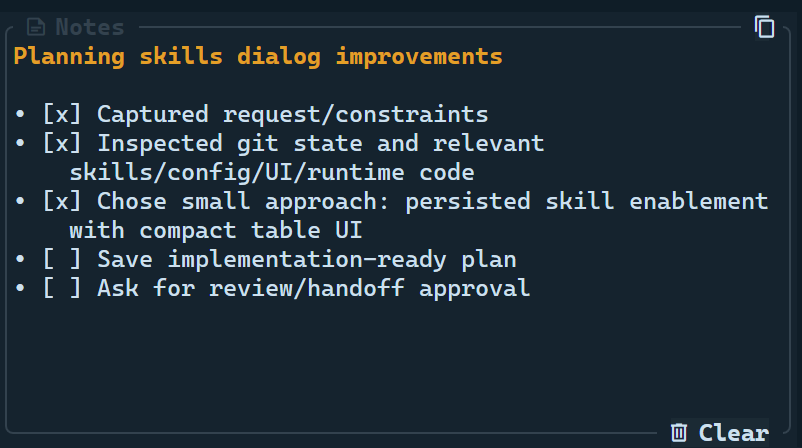
Prompt example:
While you update the docs, keep a concise Notes checklist with major milestones. Update it only at meaningful points and clear it when the work is complete.
Good notes are short enough to scan: 10-15 lines, checkboxes when useful, and only current blockers or next actions.
Ask for structured decisions
Use structured asks when an answer materially changes scope, safety, cost, credentials, or approval.
Before editing, ask me whether to update only website docs or both website and internal docs. Include a short description for each choice.
After queuing an ask, the agent should stop and wait. CodeAlta presents the questions in the session UI and sends your answers back as the next prompt.
Delegate read-only research
Delegation works best when each child has a narrow task and a bounded output.
Create two read-only child sessions for this project using the same model as this session. Ask one to inspect the agent prompt docs and the other to inspect MCP docs. Each child should return file references, gaps, and one recommended next step. Do not let either child edit files. Compare their final answers here.
For implementation work, prefer one writing child at a time so the parent can inspect and verify each result before starting another edit.
Ask child sessions for “likely cause, files inspected, risks, and one recommended test” instead of broad essays. Bounded child results are easier for the parent to compare.
Schedule a later check
Reminders are useful when a delegated session may take a few minutes or when you want the agent to revisit a state later.
Start a read-only child session to inspect the build logs. Set a reminder for this parent session in 5 minutes to check whether the child has reported back.
Reminders are delivered through normal session queue semantics while the current CodeAlta host is still running.
Switch or create modes through prompts
You can ask an agent to inspect available prompts, recommend one, create a project prompt, or switch the current session.
List available agent prompts for this project and recommend the best one for a read-only security review.
Create a project agent prompt named triage that inspects recent session history, creates read-only child sessions when useful, and reports a prioritized issue list.
Switch this session to the triage prompt for the next turn.
Use Agent Prompts for file layout, frontmatter, override rules, and authoring guidance.
Activate MCP tools for a future turn
MCP servers can be configured globally or per project, then activated for a session.
Check which MCP servers are configured and show me the config sources.
Activate the memory and docs MCP servers for this session.
MCP activation is a two-turn workflow. The agent can activate a server in response to your prompt, but newly activated MCP tools are attached to the next agent run. After activation succeeds, send a follow-up prompt such as “Now use the memory MCP tools to summarize the graph.”
For setup, policy, server formats, and diagnostics, see MCP plugin.
Compare providers or reasoning settings
Provider/model discovery and child sessions make model comparisons easier:
Find two available high-reasoning model refs for this project. Create read-only child sessions for the same investigation, one per model, then compare correctness, risk, and recommended next step when both results arrive.
Be explicit about cost, speed, and edit boundaries when comparing models.
Inspect prior sessions before acting
The session catalog can help recover context or avoid duplicated work:
Before changing files, inspect the recent sessions for this project and tell me whether another session already investigated the plugin startup issue.
Find the child sessions created from this session and summarize their final answers, grouped by model.
Safety and review checklist
Advanced workflows can mutate user-owned state through agent actions, so keep prompts explicit:
- say whether the agent may edit files or must stay read-only;
- name global vs project scope when creating prompts, MCP servers, or configuration;
- require an ask before destructive, publishing, credential, billing, or external operations;
- ask for visible notes only when progress tracking helps;
- keep child-session tasks narrow;
- review plan files, prompt files, MCP JSON/TOML changes, and final diffs before trusting the result.
Custom prompts and project-local configuration can change future agent behavior. Treat them as code-adjacent review artifacts, especially in shared repositories.