Agent Prompts
An agent prompt is a workflow you choose for a session: implement directly, plan first, review only, coordinate child sessions, or follow the release checklist of a project. CodeAlta ships Default and Plan; you can add your own, for all projects or for one.
| Layer | Files | Use it for |
|---|---|---|
| Agent prompt | prompts/agents/<id>.prompt.md |
How a session works: its mode, delegation, review rules, when to ask you. |
| System prompt | prompts/system/<id>.system-prompt.md |
Stable rules shared by several agent prompts. |
Most customization belongs in an agent prompt. Change a system prompt only for rules that apply across workflows.
The agent prompt of a session is included when it starts or resumes. Its system field chooses the system prompt, default when omitted.
Prompt composition at a glance
The selected agent prompt drives the composition: its body becomes developer instructions, and its frontmatter chooses the system prompt and the generated sections CodeAlta adds around it.
The model receives the system prompt as the system message, the agent prompt body and the generated sections as developer instructions, and your request with its attachments as the user message.
Trusted plugins can add prompt parts, and read or replace the final instructions before they are sent. This is for in-process customization and audit, not a security boundary.
Built-in modes
| Mode | Prompt id | Best for | What it does |
|---|---|---|---|
| Default | default |
Implementation work | Inspects the relevant files, edits, verifies, reviews its diff, reports the outcome, executes approved plan files, and proposes follow-up tasks for what it found beside the request. |
| Plan | plan |
Larger or riskier tasks | Researches read-only, writes a Markdown plan under .alta/plans/ and asks for your review. Once you approve it, you choose where it is carried out. |
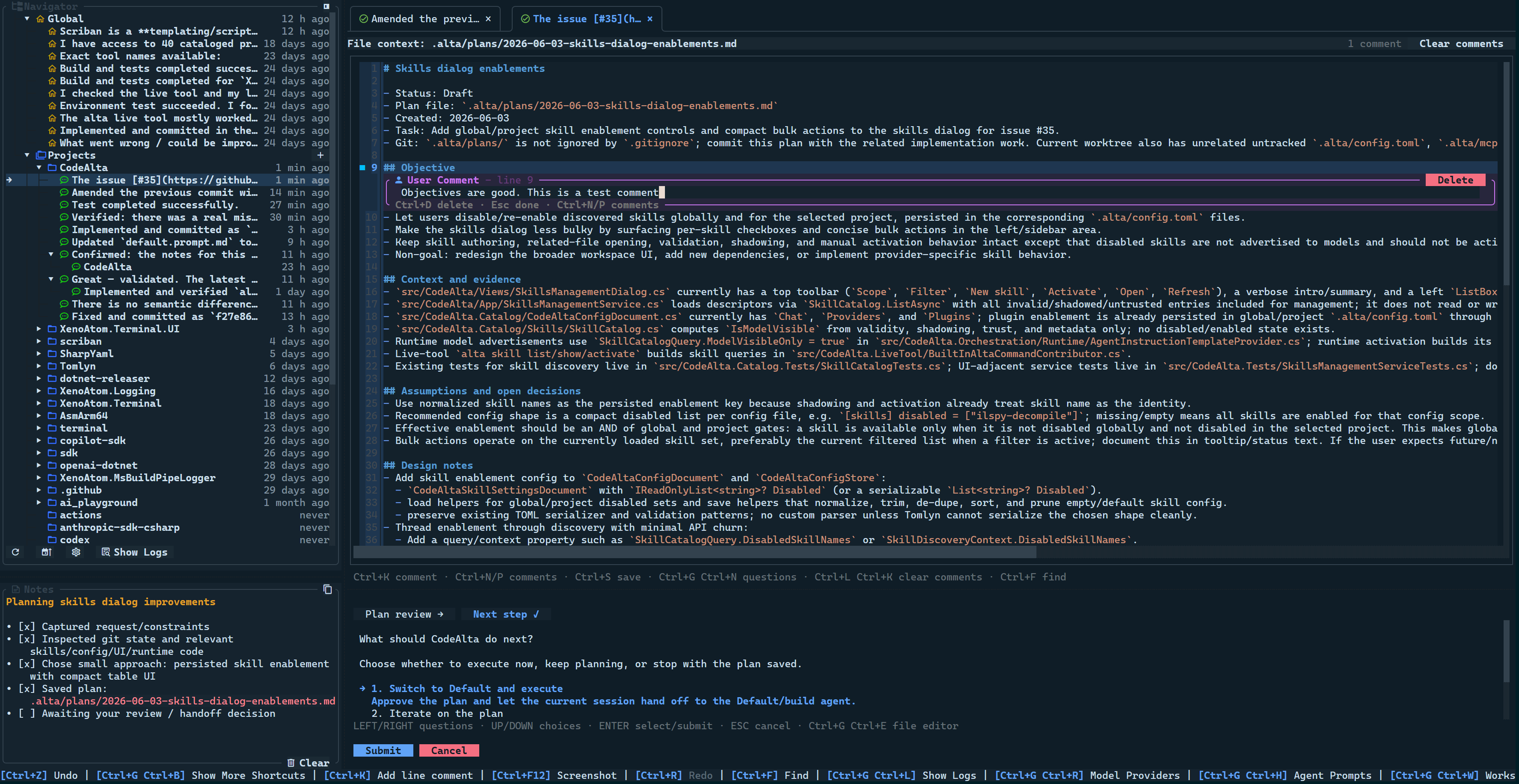
Plan mode is enforced by its prompt, not by a sandbox. The Plan prompt tells the agent to change no file but its plan, but the usual permissions still apply.
Typical prompts:
Use Plan mode for this task. Inspect the relevant docs and code,
then write an implementation-ready plan before any source edits.
Execute the approved plan at .alta/plans/2026-06-04-workflow-docs.md.
A plan starts with what changes and why, shows examples and diagrams where they help, then lists the steps. In CodeAlta Desktop an approved plan is a card of the session: start it in a new worktree, in the same session or in a new one, or keep it for later. See Work items.
When git is active and .alta/plans/ is not ignored, plan files are part of the repository: Plan keeps the plan current, and Default checks its steps off as it works.
Where prompts live
Prompts come from three places, each one taking precedence over the one before:
- the built-in prompts of CodeAlta;
- your global prompts, under
~/.alta/prompts/; - the prompts of a project, under
<project>/.alta/prompts/.
Each place has the same layout:
prompts/
  system/
    default.system-prompt.md
    my-custom-system.system-prompt.md
  agents/
    default.prompt.md
    plan.prompt.md
    reviewer.prompt.md
The id of a prompt is its file name: reviewer.prompt.md is the agent prompt reviewer, and team-release.system-prompt.md the system prompt team-release.
- Replace: a file with the same id replaces the one before it. A global
reviewerprompt can have a stricterreviewer.prompt.mdin one repository. - Append: with
mode: appendin its frontmatter, the file's body is added after the prompt it would replace. Several appended files stack in order.
The custom agents of GitHub Copilot (.github/agents, ~/.copilot/agents) are agent prompts too; a CodeAlta prompt with the same id comes first. See GitHub Copilot layout.
Create a prompt
Make a prompt of a workflow you repeat often.
- In CodeAlta Desktop, open Settings > Agent prompts with
Ctrl+G Ctrl+Hor/prompt. In CodeAlta TUI, the same keys open the prompt manager: choose Agent Prompts. - Create a Global prompt for all projects, or a Project prompt for the current one.
- Pick a short lowercase id, such as
reviewer,triageorrelease. - Fill in its name, description, system prompt (optional) and Markdown body.
- Select it with the Agent chip below the prompt (the agent selector in CodeAlta TUI), or cycle prompts with
Ctrl+T//next_prompt.
A minimal prompt file:
---
name: Reviewer
description: Review-only workflow that reports risks before code changes.
---
You are the active CodeAlta review agent for this session.

Review the requested change without editing files. Inspect relevant code,
tests, and docs. Report findings first, ordered by severity, with file and
line references when possible. If no issues are found, say so and mention any
verification gaps.
Agents see the descriptions of the prompts, to choose one or delegate to it. Keep a description short and specific, such as "Plan-first release workflow that writes a checklist and asks before publishing", and put the detailed behavior in the body.
Frontmatter fields
| Field | Required? | Use it for |
|---|---|---|
name |
Yes, unless appended | Name in the prompt selector. |
description |
No | Short summary shown to agents and users. |
system |
No | Id of the system prompt in prompts/system/<id>.system-prompt.md; default when omitted. |
mode |
No | append adds the body to the prompt with the same id before it; replace, the default, replaces it. |
append |
No | true is the same as mode: append; prefer mode. |
skills |
No | Include the guidance of available and active skills. |
project_context |
No | Include repository instructions such as AGENTS.md. |
runtime_context |
No | Include the date, platform, working folder, project root, how to link a file, and the session kind. |
tool_guidance |
No | Include the guidance of the host tools and the list of agent prompts. |
inherit |
No | Agent prompts this one is made of, such as [default, maui]. See Inherit other prompts. |
disabled_tools |
No | Built-in tools a session of this prompt does without, such as [shell_command, webget]. In CodeAlta Desktop, the prompt's Tools turned off. See Tools turned off. |
The generated sections (skills, project_context, runtime_context, tool_guidance) are all included by default. Set one to false only when a workflow needs less; without tool guidance, an agent discovers fewer of CodeAlta's features.
An appended prompt keeps the name, description, system and section settings of the prompt it adds to, unless it sets them. A project can add rules to the built-in default prompt without copying it:
---
mode: append
---
For this repository, run `dotnet test -c Release` before reporting success
when C# runtime code changes.
A narrow review prompt can keep the usual system prompt and leave out the skills and tool guidance:
---
name: Minimal Reviewer
description: Review-only workflow with a smaller generated context.
skills: false
tool_guidance: false
---
Review the requested change without editing files. Report findings first,
ordered by severity, with file and line references when possible.
Inherit other prompts
With inherit, an agent prompt is made of other agent prompts. Keep common rules in a prompt of their own and compose them, instead of copying text. With a maui.prompt.md that holds the rules of a .NET MAUI project:
---
name: MAUI Default
description: Default workflow with the MAUI rules of this team.
inherit:
  - default
  - maui
---
Prefer the MVVM Community Toolkit for new view models.
and a maui-plan.prompt.md that inherits [plan, maui].
- The text of each inherited prompt comes first, in the order of the list, then the prompt's own text.
- An inherited prompt is taken as it is in effect: with the files that replace or append to it, and with the prompts it inherits itself.
- A prompt reached twice comes once, at its first place.
- The last
systemand section fields win, and the prompt's own fields come last. Tools turned off by an inherited prompt are turned off too. - An id that names no agent prompt, or a loop back to the prompt itself, is left out.
inherit takes a list in brackets (inherit: [default, maui]), - id lines as above, or ids separated by commas. Only agent prompts inherit.
In CodeAlta Desktop, the editor of an agent prompt shows Inherits from: the inherited prompts in order, ending with the prompt itself.
- Inherit a prompt adds one; the arrow of a prompt moves it one place earlier; its name opens it.
- The line below gives the size of the composed prompt, and Preview the composed prompt shows the text the agent receives, unsaved changes included.
- The system prompt and the tools turned off that come from an inherited prompt are shown in their fields. In the list, a prompt that inherits others has a tag with their number.
Write a prompt body
A good body shapes behavior and stays short:
- the role and scope of the workflow;
- when the agent inspects, implements, verifies or stops;
- when it asks for your approval;
- whether it may delegate to child sessions;
- what notes it keeps on a long task;
- the smallest verification that counts;
- what is out of scope, and the safety limits.
A body can name what agents can do through the alta tool, such as delegation, notes, reminders or questions. You still prompt for the outcome; the agent runs the commands. See Advanced Agent Workflows.
Choose and edit prompts
The Agent chip below the prompt (the agent selector in CodeAlta TUI) chooses the prompt of the session: built-in prompts first, then global and project prompts.
- It lists the prompts of the space of the session. A new session starts with the agent prompt of its space (New sessions on the page of the space), else with
default. - On the Agent prompts page of Settings, the chip of a prompt shows and changes its spaces.
- The prompt manager lists built-in, global and project prompts, shows which ones are replaced, and creates, edits and deletes global and project files. Built-in files are read-only: create a file with the same id to replace or append to one.
Agents can manage prompts for you. Ask, for example:
List the available agent prompts for this project and recommend which
one fits a read-only security review.
Create a project agent prompt named release-checklist that plans release
steps, keeps notes visible, and asks before publishing.
Switch this session to the reviewer prompt for the next turn.
Project prompts
A project prompt specializes a workflow for one repository:
plan.prompt.mdwith the sections its plans need;reviewer.prompt.mdwith its test commands and review gates;release.prompt.mdwith its packaging and publishing checklist;triage.prompt.mdthat has child sessions read logs, issues and recent sessions.
A default.prompt.md that replaces the built-in one, without mode: append, should keep its Review by the user section, or say the same in its own words. That section tells the agent to wait for your approval before it commits when Review before commit is on, and how to answer your review. Without it, the agent learns only when its commit is refused. An appended prompt keeps the section.
A prompt that has its agent ask for your review of a file, such as a plan, must use alta review request file <path> --stdin, with the questions on stdin; for the changes, alta review request changes. alta ask given a file refuses with ask.fileMoved and names that command. See Reviews.
Project prompts are part of the repository. Review a prompt change like a code change: it changes how agents decide, ask, delegate and edit files.
System prompts
A system prompt holds stable host rules; keep it short. It takes mode: append too, so a global or project file can add to default.system-prompt.md without copying it:
---
mode: append
---
Always mention this team's release freeze window before proposing publish steps.
A new system prompt is used only by the agent prompts that name it:
- Create the system prompt, such as
prompts/system/team-release.system-prompt.md. - Name its id in the System Prompt field of an agent prompt (
system: team-release), not its path. - Select that agent prompt for the session.
---
name: Release Coordinator
description: Release workflow using the team release system prompt.
system: team-release
---
Coordinate the release checklist, verify packaging steps, and ask before
publishing.
For the built-in Default or Plan modes to use it, create a global or project default.prompt.md or plan.prompt.md, appended or replacing, with the system field. That changes every session of that mode in its scope.