Model Tiers and Fallback
Instead of a model, a session can run on a tier: Complex for hard work, Standard for everyday work, and Quick for searches and simple tasks. Each tier is a list of models you choose, the preferred first. A session on a tier takes the first of them whose provider is ready.
When a provider runs out of quota or stays unavailable, the fallback can move a session to the next model of its tier, so the work goes on with another model or another account.
Set the tiers
In CodeAlta Desktop, open Settings > Models: the Model tiers section comes first.
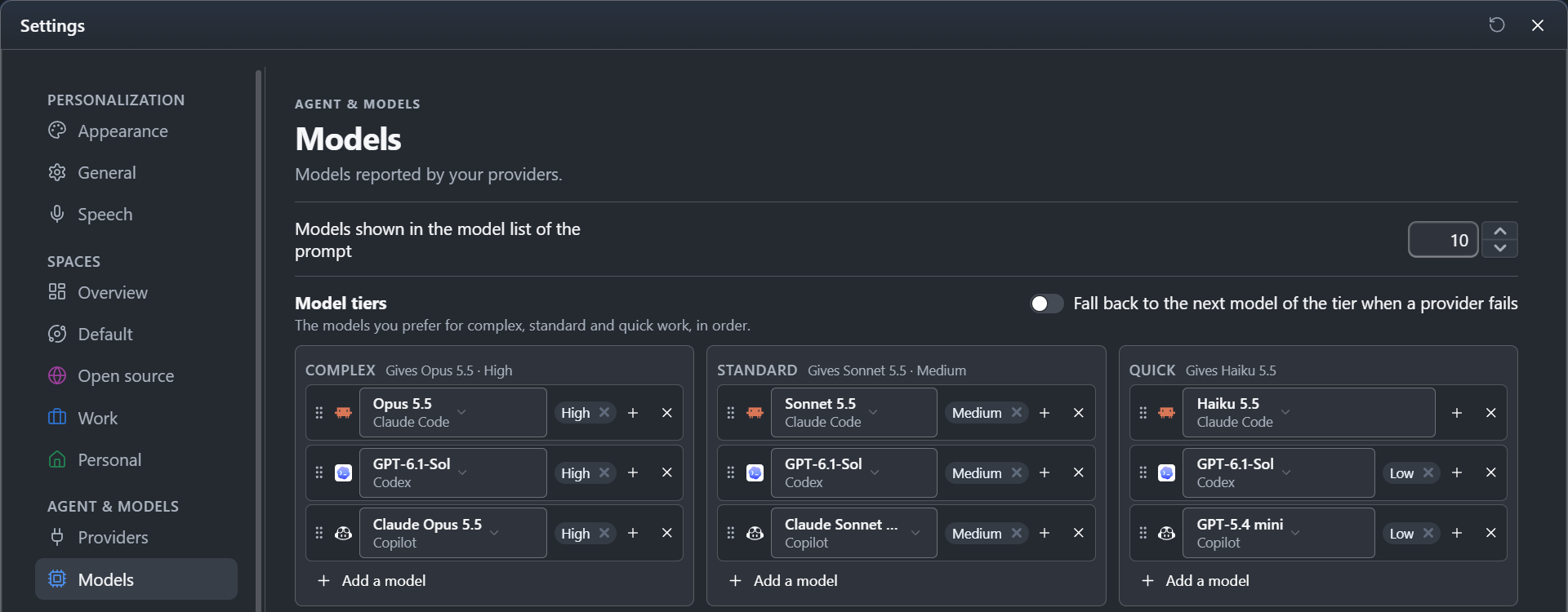
- Each row of a tier is a provider, a model and the reasoning efforts to use, the preferred first. Add a model adds a row, and its
×removes it. - Drag a row by its grip to move it up or down its tier, or into another tier. With the keyboard,
Alt+UpandAlt+Downon the grip move it in its tier,Alt+LeftandAlt+Rightto the tier beside it. - To change the model of a row, click its name and choose another one: the row keeps its place, and the efforts the new model offers too.
- The heading of a tier says the model it gives now, or No model ready when none of its providers is ready.
- A row whose provider is no longer configured is shown in red and fixed the same way.
- A provider that is only in some spaces is named with them, as Only in Work: its models count only in the sessions of those spaces.
Every change is saved at once.
Use a tier
Once tiers are set:
- the model list of the Agent chip below the prompt shows Complex, Standard and Quick first, each with the model it gives now. Choosing one puts the session on that tier (see Agent prompt, model and permissions);
- a new session starts on Standard, also one an agent creates without naming a model;
- agents give a tier to the sessions they create, Quick for a search and Complex for a hard problem, with
alta session create --tier quick. The instructions of a session list the tiers, andalta model resolve --tieranswers which model a tier gives now.
Tiers of a space
The tiers and the fallback of Settings > Models are the usual settings: those of the Default space and of every space that has none of its own.
A space can have tiers and a fallback of its own: in Settings > Spaces, open the space and set Model tiers to Customize in its New sessions section.
- The tiers start as a copy of the global tiers and replace them for the sessions of that space, also for a tier they leave empty.
- Add a model offers the providers of the space, so a provider you keep for that space alone, such as a work account, goes in its tiers. A row whose provider is not in the space says Not in this space.
- The fallback switch and its two boxes are the space's own. Until you change them there, the space follows the fallback of Settings > Models.
With Use global, the space has the usual settings again, and the section says what each global tier gives.
Wherever its tiers come from, a session never takes a model whose provider is not available in its space (see Providers of a space).
Fallback when a provider fails
The fallback is off until you turn it on, with Fall back to the next model of the tier when a provider fails in the Model tiers section, or in the New sessions section of a space with tiers of its own. Its two boxes choose the failures it acts on, both by default:
- Quota reached: the quota, the usage limit or the credits of the account are used up, or the provider limits requests for more than a minute;
- Provider unavailable: the provider stays unavailable (outage, overload, network) after its own retries, or the account cannot use the model (unknown to the provider, or not in the plan of the account). For a model the account cannot use, the session goes on with the next other model of the tier, which can be another model of the same provider.
Any other failure stops the session as before: a sign-in problem, a tool or a test that fails, a conversation too long for the model, a run you stopped.
A session on a model you chose yourself falls back along the tier where that model comes first. The fallback only uses the models you listed: listing a model of a provider is what allows CodeAlta to use that account. A provider whose limit is reached is skipped, with all its models, until the limit resets: at the time the provider gives, or 15 minutes later when it gives none. The session keeps its permission mode, or takes a narrower one when the new provider does not offer it: a fallback never lets a session do more without asking you.
When a session falls back:
- its timeline shows a Model changed after a failure card, with the model it left and the model it now runs on;
- a notification says so, with Show to open the session;
- the session receives a message from CodeAlta that asks the agent to continue the task, and to check what an interrupted command or edit already did before it runs it again;
- a session that delegated the work gets the answer of the run that continues, not the failure.
When no other model of the tier can take over, a warning card says so: choose another model, or send again once the limit resets.
In the file
The tiers and the fallback are the [models] table of ~/.alta/config.toml. Each entry is provider:model, followed by @ and the reasoning efforts in order; the provider is the key of a provider of the Providers page:
[models.tiers]
complex  = ["claude-code:opus@high,xhigh", "codex:gpt-6.1@xhigh", "copilot:claude-opus-4.6@high"]
standard = ["claude-code:opus@medium", "codex:gpt-6.1@medium"]
quick    = ["claude-code:haiku", "codex:gpt-6.1-mini@low"]

[models.fallback]
enabled = true
on = ["quota", "unavailable"]   # the failures to fall back on; both by default
The tiers of a space are in the file of the space, under new_sessions.tiers, written the same way, and its fallback under new_sessions.fallback (see Files):
new_sessions:
  tiers:
    standard: ["work-claude:opus@medium", "codex:gpt-6.1@medium"]
  fallback: { enabled: true, on: [quota] }
A space without tiers takes the tiers and the fallback of config.toml; one with tiers and no fallback takes the fallback of config.toml.
CodeAlta TUI
CodeAlta TUI has no page for the tiers and does not offer them in its model list. Its agents still use the tiers of the file with alta session create --tier.