Work items
Work items are what is left to do in a project: the tasks agents propose and the plans written in Plan mode. CodeAlta Desktop shows them where you decide on them, and lists them all in one tab.
Tasks
While an agent works, it can find something that is not part of what you asked: a gap, a problem, or an improvement. Before it ends its turn it proposes a follow-up task for it. The session shows the proposal at once, as a card in its top right corner:
- a title, what kind of finding it is, and a short summary;
- Details opens the full description;
- with several proposals, the arrows go from one to the next.
You decide on each card:
| Choice | What happens |
|---|---|
| Start in a new worktree | A new session does the task in its own worktree, on a new branch. |
| Do it in this session | The session does it after its current work. |
| Start in a new session | A new session does it in the folder of the project. |
| Later | The task is kept, out of the way. |
| Dismiss | The task is not worth doing. |
Agents are told to propose a task only for something concrete they verified, and not to start it themselves. A session has at most five proposals waiting.
Plans
A plan is a document you review before the work starts. In Plan mode the agent researches, writes the plan and asks for your review: the plan opens as a formatted page, and Source and comments shows its text, where you comment on lines or edit it.
Once you approve it, the session shows the plan as a card with the same choices as a task. Nothing starts until you choose.
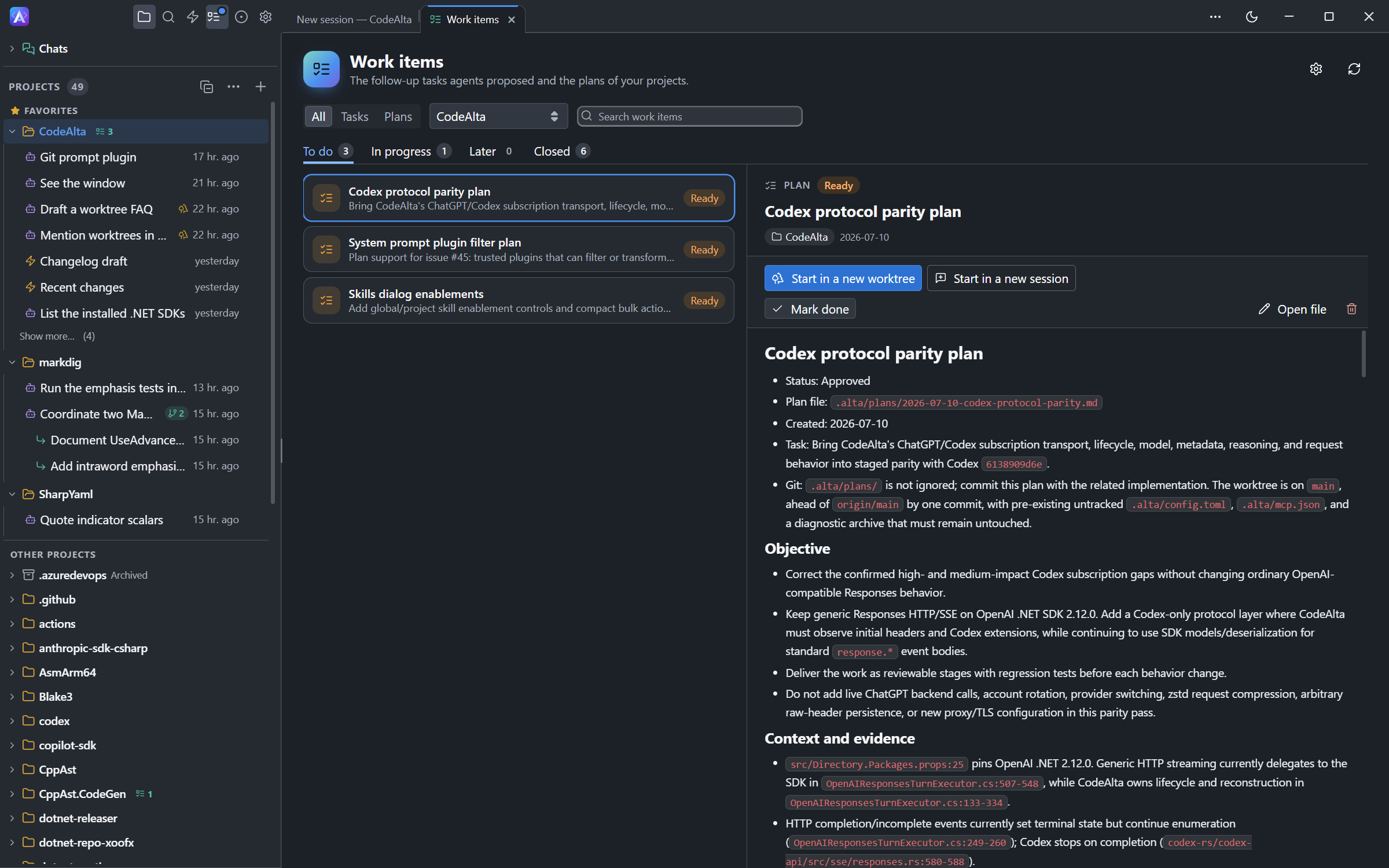
The Work items tab
Open it with the checklist icon of the activity bar, with Ctrl+G Ctrl+I, or with the mark of a project in the Explorer.
- To do, In progress, Later and Closed separate what waits from what is done.
- Filter by tasks or plans, by project, or by text.
- Select an item to read it, start it, mark it done, open its file, or remove it.
In the Explorer, a project shows how many work items wait for you, and a dot while a session works on one.
Files
Each work item is a Markdown file of its project, which you can read, edit and commit:
| Kind | File | Status |
|---|---|---|
| Task | .alta/tasks/yyyy-mm-dd-name-xxxx.md |
pending, later |
| Plan | .alta/plans/yyyy-mm-dd-name.md |
draft, approved, in-progress, done, blocked |
The name of a task ends with four random characters, so that two branches of a project never create the same file.
---
title: "Report why the model list is empty"
kind: gap
status: pending
created: 2026-10-07
summary: "The Models page shows nothing for a provider that failed. It should say why."
---

## Why
...
Plans written before plans had this header are listed too, from their title and their - Status: line.
A completed or dismissed task is deleted, and a completed plan is kept. Settings > Work items changes both, turns task proposals off, hides the cards, and chooses which way of starting comes first.
From an agent
Sessions use the same work items with alta task and alta plan, in CodeAlta Desktop and CodeAlta TUI:
Show me the open tasks of this project and do the one about the model list.
Mark the plan 2026-10-07-task-cards as done.
CodeAlta TUI has the commands; the cards and the tab are in CodeAlta Desktop.