Agents of the ACP Registry
The Agent Client Protocol (ACP) lets an application run a coding agent: GitHub Copilot, Gemini CLI, Cursor, Qwen Code, OpenCode and many others. The agent keeps its own models, tools and account; CodeAlta runs it as a provider.
A session of an ACP agent is a CodeAlta session like the others: you can continue it with another provider, such as Codex or Claude Code, and come back to the agent later.
Add an agent
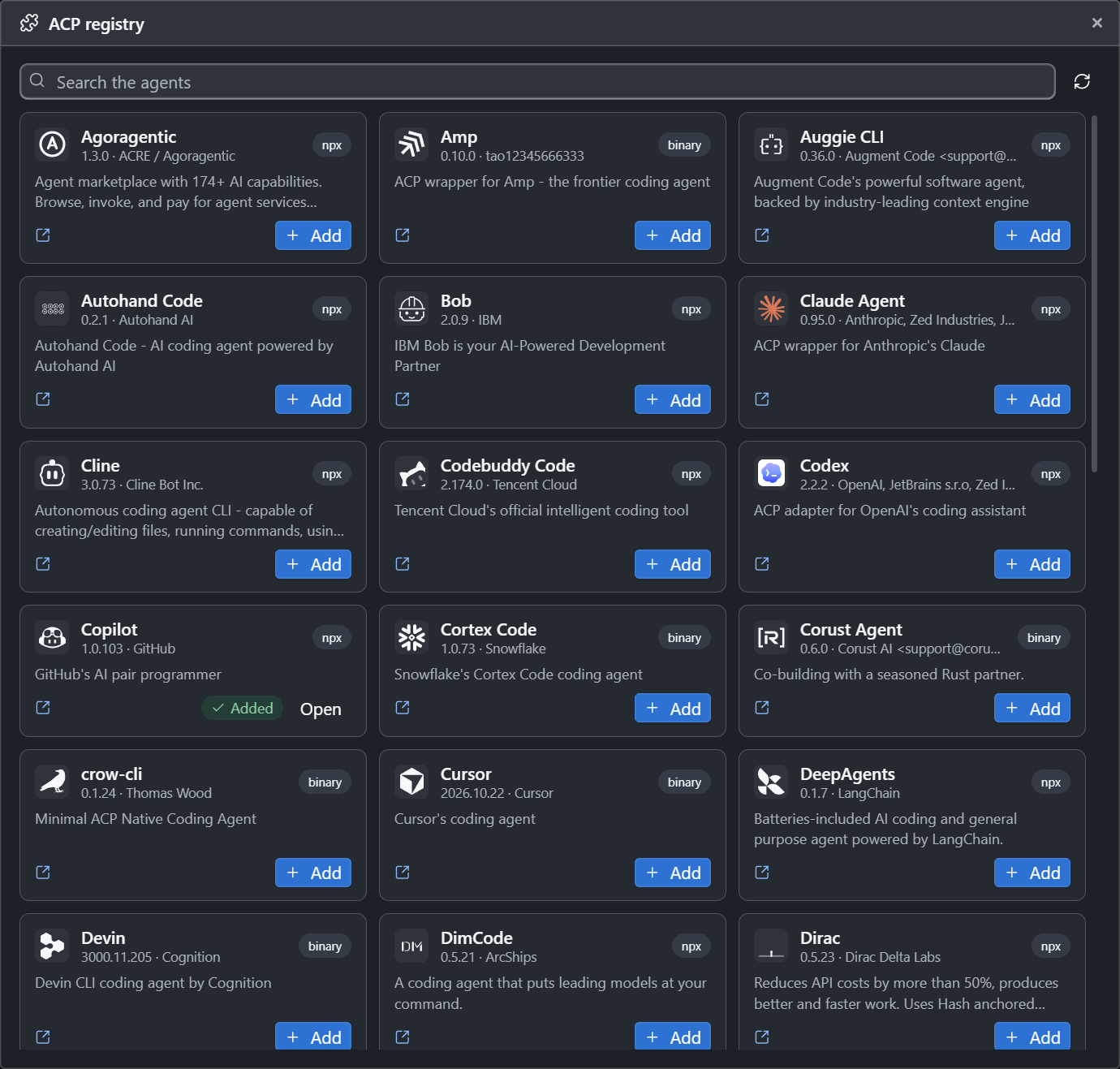
- In CodeAlta Desktop, open Settings > Providers, choose Add provider, then ACP registry…. The window lists the agents of the ACP registry, with a search.
- Choose Add on an agent.
- An agent that comes as a program is downloaded into
~/.alta/cache/acp, with its progress. - One that comes as a package runs with
npx(Node.js) oruvx(uv), which fetch it when it first starts. - An agent that cannot run on your computer says why, for example when Node.js is missing.
- An agent that comes as a program is downloaded into
- Choose Open, then Test selected provider. The test starts the agent and reads its models without calling one.
- Start a session with it, and choose its model and reasoning below the prompt, as for any other provider.
After the test, the tags of the provider say what the agent can do: take CodeAlta's instructions in its system prompt, call CodeAlta's tools, read images, resume a session after a restart.
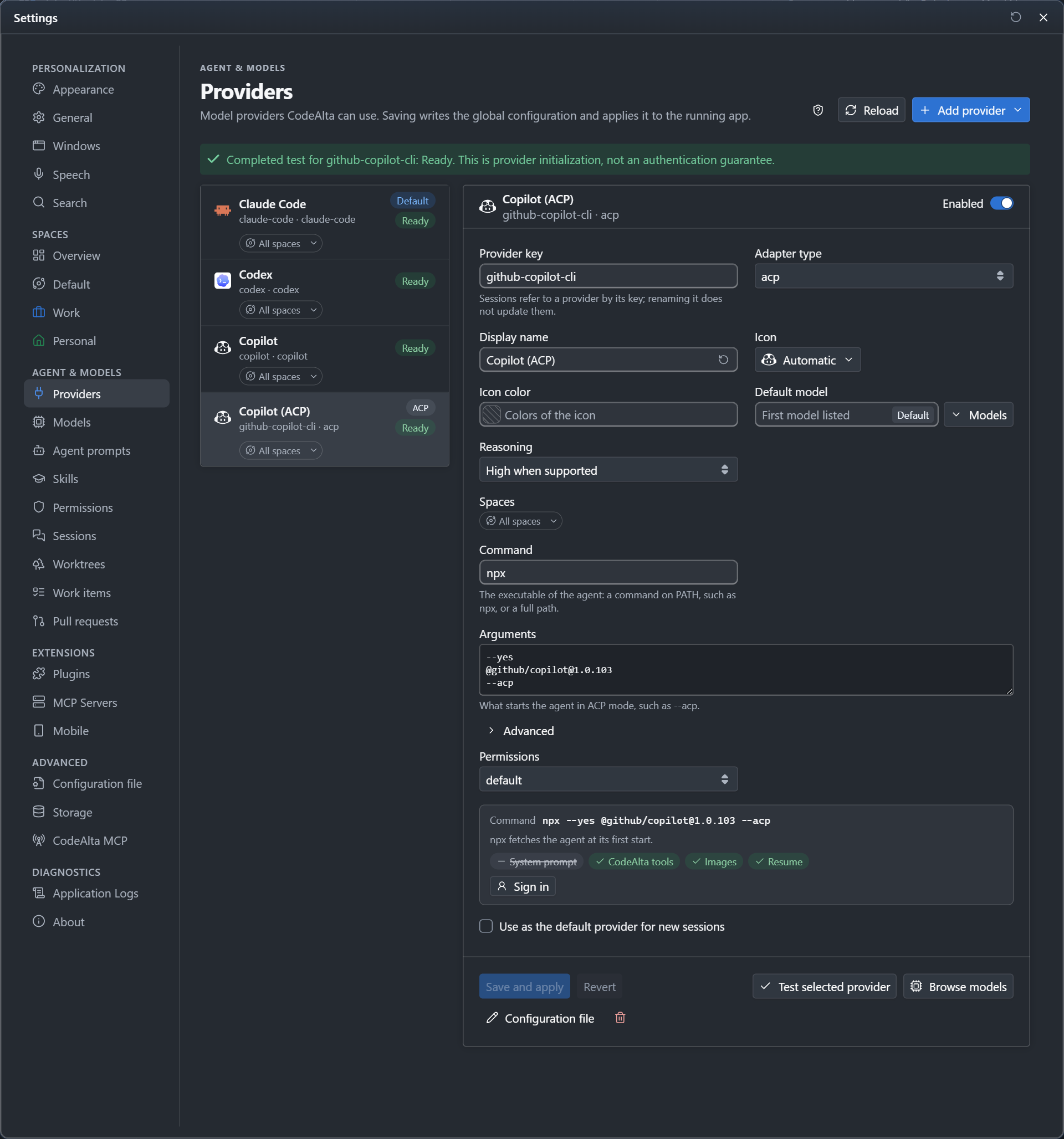
An agent named like a provider you already have is added with (ACP) after its name, such as Copilot (ACP) beside the Copilot provider of CodeAlta.
Sign in
When the agent is not signed in, its form says so and shows how to sign in. A command to run in a terminal comes with Run in a terminal, which opens a terminal in CodeAlta with it. Test the provider again once you are signed in.
In a session
- The agent works with its own tools (reading and editing files, running commands) and asks before it acts. The permission mode of the session answers for it: reads always, edits in Accept edits, everything in Bypass permissions; you are asked otherwise.
- CodeAlta's tools reach it through an MCP server of the session: the
altatool, the tools of plugins, and the tools turned on during a turn, such as the UI tools withalta ui activate. - The model list shows the agent's models with their names, limits and prices, and the reasoning levels of each, read when the provider is tested. A Cursor model runs at the level of its variant, such as High for
grok-4.7[context=256k,reasoning_effort=high,fast=true]. - Its tool calls, plan, thoughts and file changes appear in the timeline, and its usage, when it reports one, in the context usage of the session.
- The agent keeps its own context and compacts it itself. After a restart, the session goes on in the same session of the agent when the agent can resume one; otherwise the agent is told the conversation.
Limitations
An ACP agent runs its own loop with its own tools, context and account: CodeAlta sees only what the agent reports, and some of its features work less well than with a provider it drives itself, such as Codex, Claude Code or an API key. Check the tags of the provider after its test.
- Usage and cost. Some agents, such as Cursor, report no token usage: the context usage of the session is estimated from the conversation (
~13.1k/256kbelow the prompt, marked Estimated in its window), and their turns add no tokens or cost to Statistics. The usage of the agent's own subscription is not shown. - CodeAlta's tools. Without the CodeAlta tools tag, the agent runs without
altaand the tools of plugins: no sub-agents, notes, reminders, reviews or UI tools in its sessions. - Instructions. Without the System prompt tag, CodeAlta's instructions and the agent prompt come with the first prompt of a session and after a compaction, and the agent may follow them less closely.
- Review before commit only asks the agent not to commit: CodeAlta cannot refuse a commit the agent runs with its own tools.
- Fork, rewind and other providers. When the agent's session no longer matches the conversation (a fork, a rewind, turns of another provider), the agent starts a new session that is told the conversation as text: it loses its own state and its prompt cache.
Update or turn off
- Update in the form of an agent installs the version the registry has now.
- The agents come from the built-in ACP agents plugin of Settings > Plugins. Turning it off while a session of an agent is at work asks first: the turn is stopped, and the session can go on later.
Write one by hand
An agent that is not in the registry is a provider of type acp:
[providers.my-agent]
type = "acp"
display_name = "My agent"
command = "my-agent"         # a program on PATH, or a full path
arguments = ["--acp"]        # what starts it in ACP mode
env = { MY_AGENT_LOG = "1" } # optional: variables of its process
permission_mode = "default"  # optional: default, acceptEdits or bypassPermissions
An agent added from the registry also has agent and agent_version, the name and version of its registry entry.