Search
CodeAlta Desktop keeps a search index of your work on your computer: the prompts and final answers of your sessions, their notes, the plans and tasks of your projects, the user guide, the skills, the tools and the plugins. The search window finds them as you type, and your agents find them with alta search. Nothing of it is sent anywhere.
The index is on by default and costs little: a few megabytes and well under a second for a few hundred sessions, built in the background after the start. It never slows the window: a query takes a few milliseconds.
Find a conversation
Press Ctrl+P and type a few words. Besides your sessions, projects, files and commands, the search window has three groups that come from the index:
- Conversations: the prompts and final answers of your turns, the notes of sessions, and the plans and tasks of projects. A hit shows the session, who wrote it (Prompt or Answer), when, and the words found.
- Docs: the sections of this user guide, the pages of the built-in plugins included.
- Tools: the tools agents have, the
altacommands, the MCP servers and the plugins.
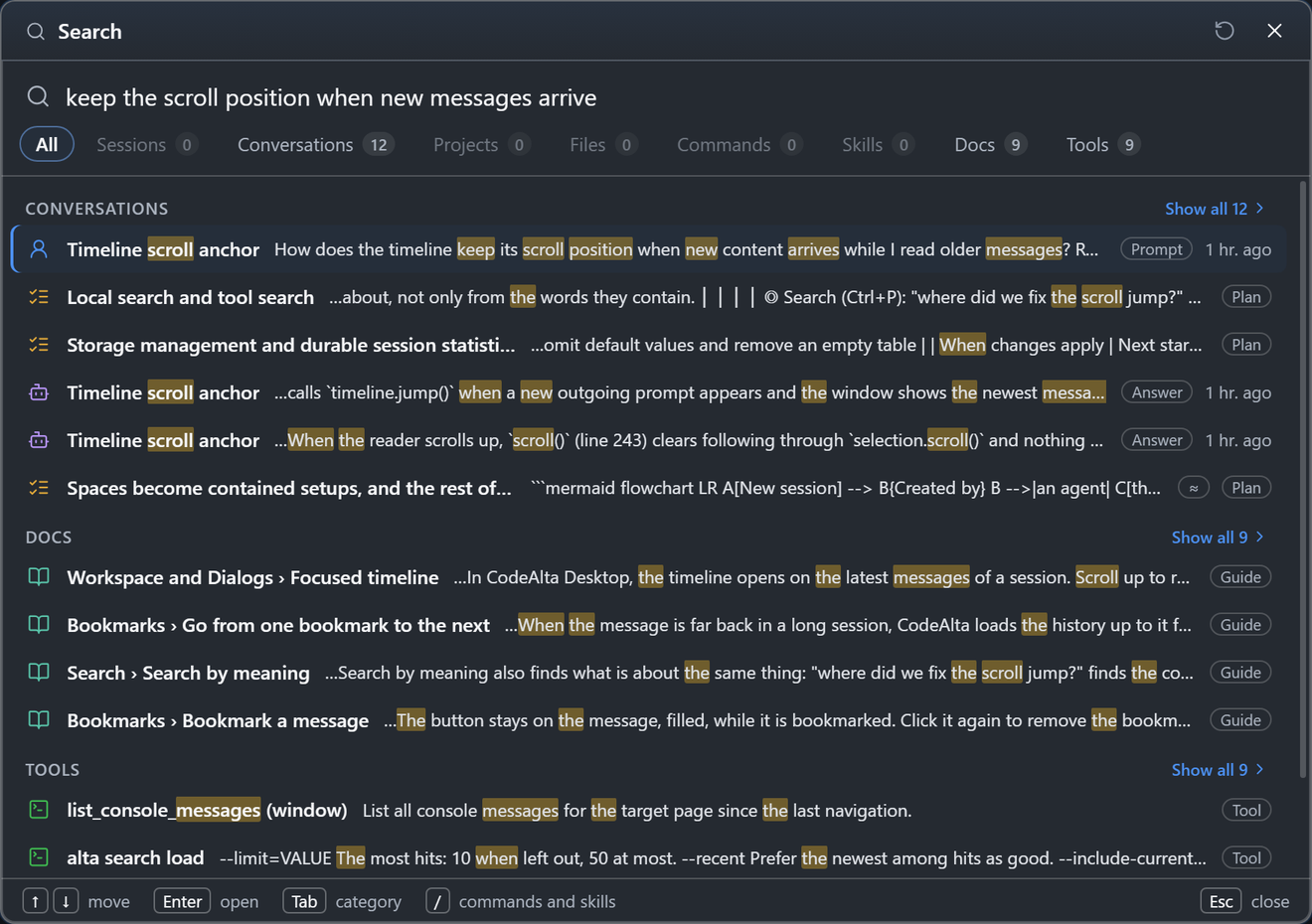
Tab goes to each group, and Enter opens what is selected:
| You open | What happens |
|---|---|
| A message | Its session opens at that message, as a bookmark does. |
| A note | Its session opens. |
| A plan or a task | Its file opens in the code editor. |
| A section of the guide | The Documentation tab opens at that section. |
| An MCP server or a plugin | Its page of Settings opens. |
| A tool | Its description is shown. |
Search sessions… in the menu of a project also finds the conversations of that project.
Only the prompt that starts a turn and the final answer of the turn are indexed. The messages of a run between its tool calls, steering, tool outputs and reasoning are left out: they are progress notes that mean something only next to their run. An agent reads them around any hit with alta search show --full.
A query matches words and the parts of identifiers: fingerprint journal finds JournalFingerprint, and read file finds read_file. The last word you type matches the start of a word.
Search by meaning
Words find what was written with the same words. Search by meaning also finds what is about the same thing: "where did we fix the scroll jump?" finds the conversation that says "the timeline jumped while scrolling", in another language too.
It needs a model that runs on your computer, so it is off until you turn it on. CodeAlta offers it once there is enough to search (ten sessions, or three days of work), in calm places only: the foot of the search window when a sentence finds few conversations, and Settings › Search. Not now asks again in a month; Don't ask again never does.
The dialog says what it takes before anything is downloaded:

- Download: the model once (EmbeddingGemma 2, 304 MB, or Granite 97M, 117 MB, with their tokenizers), and the ONNX Runtime (about 10 MB), unless speech to prompt brought it already.
- Disk: about 800 bytes per indexed chunk.
- Time: the first indexing runs in the background, newest work first. It pauses while you dictate, and Pause stops it.
| Model | Size | Languages | Strong at |
|---|---|---|---|
| EmbeddingGemma 2 (Google, Apache-2.0) | 304 MB | 100+ | code and prose; the default |
| Granite 97M multilingual (IBM, Apache-2.0) | 117 MB | 200+ | speed: about four times faster |
A notification follows the download and the indexing; it can be closed, and the progress stays in Settings › Search. Search works during the indexing: what is not embedded yet is found by its words. A hit found by its meaning only is marked ≈.
The model comes from Hugging Face at a pinned commit and the runtime from nuget.org; every file is checked against its SHA-256 before it is used. The model runs in processes of its own, never in the window. Batches at once in Settings › Search says how many: 2 by default, up to half the cores of your computer. Each one takes about 1 GB of memory with EmbeddingGemma 2 (less with Granite) and its share of the cores: two index about 1.6 times as fast as one, three about 1.8 times. A change applies at once, during the indexing too. Once the indexing is done, the extra processes end after 30 seconds and the last one after ten minutes without work, and their memory is given back.
The Search canvas
The Search canvas shows what the index holds, lets you try a query and see why each hit comes where it does, and shows how search is used. Open it with Open Search in Settings › Search, Search index in the search window (/search_index), the Search card of the welcome page while the index is built or search by meaning is offered, or alta canvas open search. It opens as a tab beside your sessions, and each space has its own: it shows what that space can see.
It has three pages:
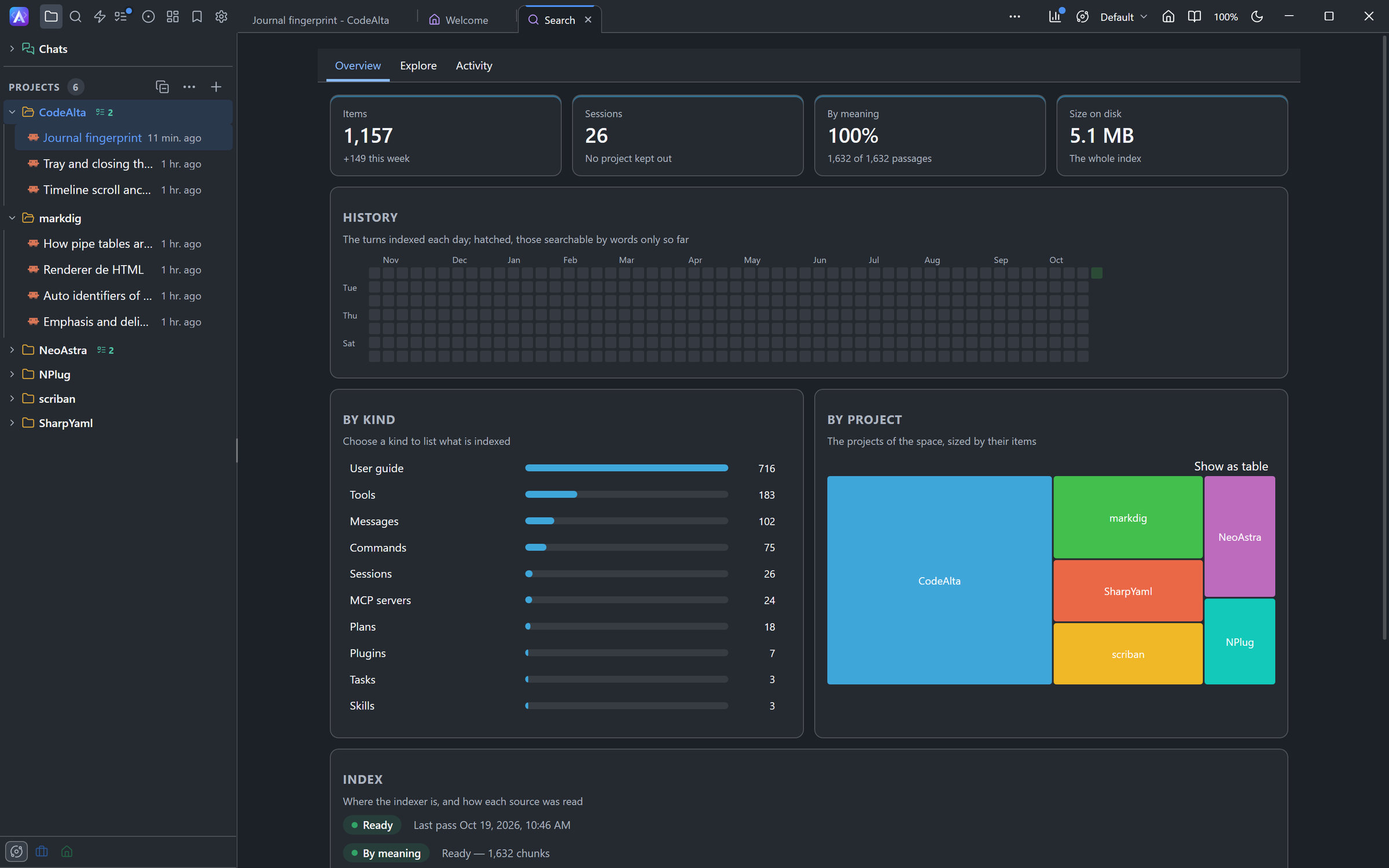
meaning #1), which its words alone rank far lower.- Overview: what is indexed. Four tiles give the items and those of the last week, the sessions and the projects kept out, the share searchable by meaning (or By words only while search by meaning is off), and the size of the index on disk. Below them: the turns indexed each day over the last year, hatched for the days that are searchable by words only so far; the items by kind and by project (a project kept out of search is hatched and marked "kept out"); and where the indexer is, the progress of search by meaning with its speed, and when each source was last read. Click a kind or a project to list its items in Explore.
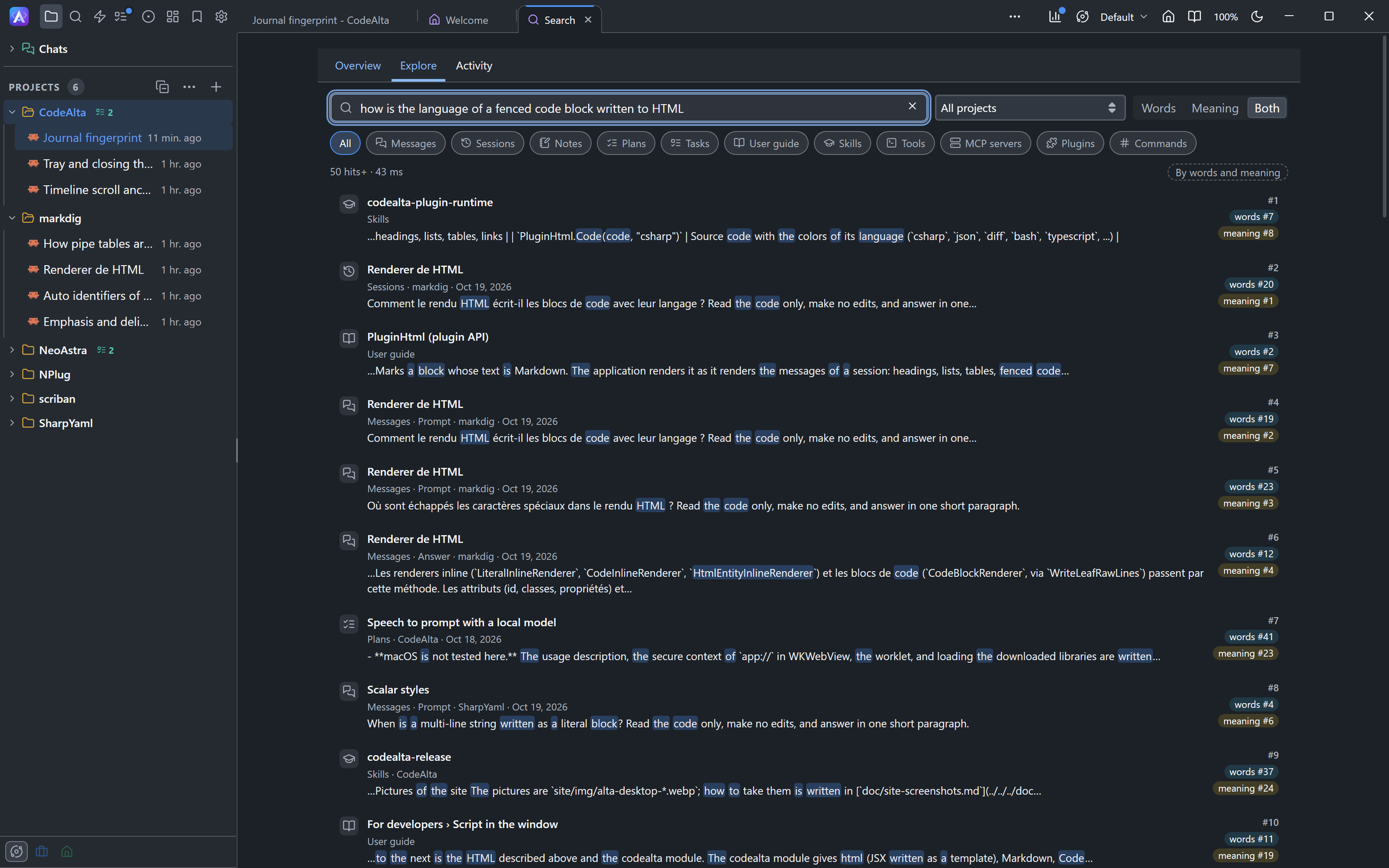
- Explore: what a query finds, and why. Type a query, choose a kind and a project, and while search by meaning is on, Words, Meaning or Both, to compare them on the same query. Each hit shows its kind, its project, its date and the words found, and at its right its rank and what it comes from:
words #3 · meaning #1, or≈ meaning #1for a hit found by its meaning alone.UpandDownmove,Enteropens the hit as the search window does. With no query, it lists the kinds and their counts, and a kind lists its items, the newest first. - Activity: how search was used in the last 90 days. The searches, the share that found nothing, the median time by words and by meaning, the tokens tool search kept out of the prompts once there are some, and the searches of each day by who asked: you in the window, your agents, tool search. The words searched are never kept.
The canvas asks the index only while its tab is shown.
Settings
Settings › Personalization › Search has what search can be set to:
| Setting | What it does |
|---|---|
| Search index | Off, nothing is indexed: the search window has no Conversations, Docs or Tools, and alta search answers unavailable. |
| Conversations | Off, the sessions are left out; the guide, the plans, the skills and the tools stay. |
| Check now | Reads every source again at once instead of at the next pass. |
| Search by meaning | On or off, the model, the progress of the download and of the indexing, Pause, and Delete for a model that is not in use. Off stops the work at once and keeps the model and its vectors, so turning it on again is immediate. |
| Batches at once | How many batches of text search by meaning embeds at the same time, each in a process of its own: faster, and more memory. |
| Kept out of search | The projects and the spaces kept out, each with Include in search. |
The choices are kept in the [search] table of ~/.alta/config.toml:
[search]
enabled = true          # the index
sessions = true         # the prompts and final answers of sessions
semantic = false        # search by meaning
model = "embeddinggemma-2"
parallelism = 2         # batches embedded at once, up to half the cores
excluded_projects = []
excluded_spaces = []
Keep a project or a space out of search
Exclude from search in the menu of a project, and Search this space in the settings of a space, keep them out: nothing of them is indexed, what was indexed is removed at once, and no result shows them, to you or to an agent. Their sessions can still search what is global: the guide, the skills of the user and the tools. Include in search lets them in again, and they are indexed at the next pass.
A repository can keep itself out for everyone who opens it, with [search] enabled = false in its own .alta/config.toml.
What agents get
Agents of CodeAlta Desktop have the same index through the alta tool:
alta search "why did we change the journal fingerprint" --kind message --project .
alta search "post a message on slack" --kind tool,mcp,skill
alta search "worktree cleanup" --kind doc
alta search show msg:<session>/<message> --context 2
alta search load mcp:slack/post_message
alta search status
The tools of an MCP server are found once CodeAlta has listed them (when a session activates the server, a test in Settings, a run): no server is started for search. alta search reindex --kind mcp lists every enabled server once to find the tools of those never listed.
alta search load gives the agent's session the MCP tools it found, one by one, without the other tools of their server. The agent calls them in the same turn, and the session keeps them when you come back to it later. It is refused while you review the commands of the session.
Each hit gives its ref, a snippet with the words found in bold, whether it was found by its words, its meaning or both, and next: the command that uses it, such as alta skill activate …, alta mcp tool call … or alta documentation read …. An agent sees what its space and its project can see, never anything of a project or a space kept out, and not its own session unless it asks with --include-current.
Where the files are
| What | Where |
|---|---|
| The index | search.sqlite3 in the data folder of CodeAlta (~/.alta/data/, or ~/.alta/dev/data/ for the developer instance) |
| The models | ~/.alta/cache/search/models/ |
| The ONNX Runtime | ~/.alta/cache/runtime/sherpa-onnx/, shared with speech to prompt |
The index is derived from your sessions and files: deleting it loses nothing, and the next start builds it again.