Sandbox
A sandboxed session runs its commands and its file tools in a container of the operating system. What it can read, write and reach is what its sandbox allows, whatever its permission mode. A prompt slipped into a web page or an issue cannot then read your credentials, change files outside the project, or leave behind something that runs later on your computer.
The sandbox is off by default. Turn it on for every session, or only where you want it: a provider, a model, a space, a project, one session.
What it protects
In a sandboxed session:
- Commands, file tools and background jobs run in the container. They write in the folder of the session, its worktree, its scratchpad and a temporary folder, and read the system and your developer tools.
- Your home folder is out of reach, except the developer tools. So are the files of CodeAlta (
~/.alta), your SSH keys and the credentials of providers and clouds. - Files that run programs later stay read-only, even inside the project:
.git/config, git hooks, the.altasettings and plugins, the settings of editors and of other coding agents. - The network is what the profile says: the package registries only, nothing, or the internet. This computer and its local network are never reached.
- The environment has no secret of yours, unless the profile names it.
It does not protect against what you allow: a command you let run outside the sandbox runs with your rights. The model provider still receives what the session sends it.
Turn it on
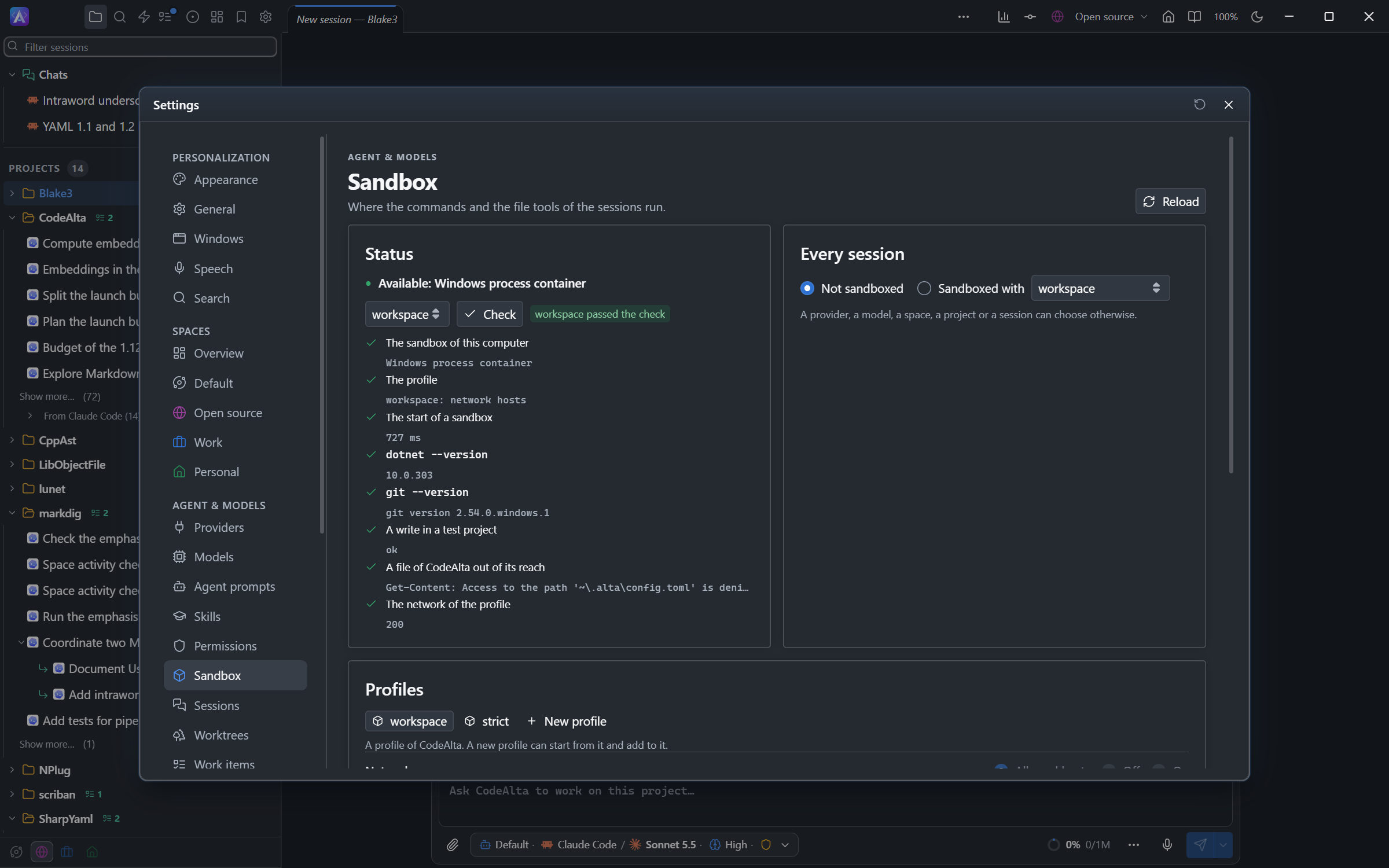
In CodeAlta Desktop, Settings > Sandbox has:
- Status, with Check, which starts a test sandbox and shows each step: the developer tools, a write in a test project, a file of CodeAlta that must stay out of reach, the network.
- Every session: not sandboxed, or sandboxed with a profile.
- Profiles, and Where it applies: the providers, models, spaces and projects that choose a sandbox, each with a link to where it is set.
A sandbox is also chosen:
- for a provider, in its form in model providers;
- for a space, in its New sessions card (see spaces);
- for a project, with Sandbox… in the actions of its row;
- for one session, in the Sandbox row of the Agent chip, or of the form of a new session.
When several say something, the most specific wins: the session, then its model, its provider, its project, its space, then every session. Not sandboxed can be chosen at each level, for example for a project you trust.
The chip shows a small mark on a sandboxed session; its tooltip names the profile and where it comes from.
In CodeAlta TUI, the sandbox follows the same settings; it is set in CodeAlta Desktop, in config.toml, or with alta session.
Profiles
Two profiles come with CodeAlta:
| Profile | Network | Run outside |
|---|---|---|
workspace |
The package registries: NuGet, npm, Yarn, PyPI and crates.io | Asked each time |
strict |
None | Never |
New profile makes a profile of your own, which starts from the profile shown and adds to it:
- Folders: more folders to read and write, to read only, or never to reach.
- Network: Allowed hosts (
*.example.comfor a domain and its subdomains), Off or On. - Local ports: ports of this computer it may reach, such as a local database.
- MCP servers: the servers a sandboxed session may use. Others are not offered to it.
- Run outside: Ask me, or Never.
In ~/.alta/config.toml:
[sandbox]
all_sessions = "workspace"

[sandbox.profiles.company]
extends = "workspace"
hosts = ["pkgs.dev.azure.com", "*.company.com"]
local_ports = [5432]
mcp_servers = ["docs"]

[providers.ollama]
sandbox = "strict"
A [sandbox] table in the .alta/config.toml of a repository is ignored: a repository does not choose its own sandbox.
Run a command outside
A command that cannot work in the sandbox, such as a publish that needs your API key, can ask to run outside it, with the reason. You are asked each time, in every permission mode, Bypass permissions included:
Run outside the sandbox?
  dotnet nuget push bin/Lib.1.2.0.nupkg --source nuget.org            in C:\code\Lib
  "Publishing needs the API key in your NuGet.Config, which the sandbox cannot read."
  [Allow once]  [Deny]
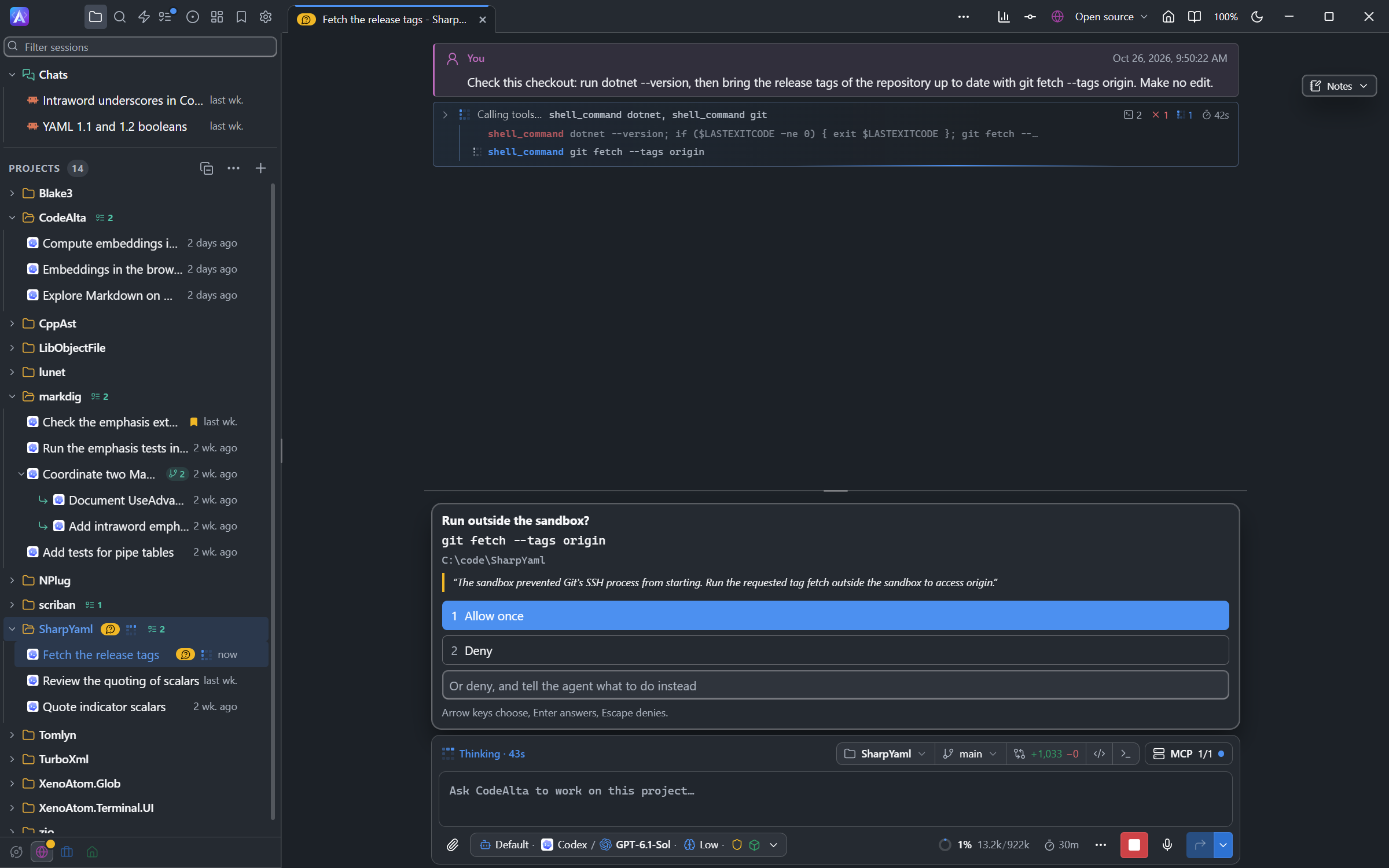
git fetch from reaching GitHub: the agent asks to run it outside, and says why.The timeline marks the commands that ran outside. With the strict profile, or Never, no command leaves the sandbox: the agent asks you to run it.
When the sandbox blocks a command, the agent is told what blocked it, a host or a file, so that it does not try again the same way.
What the agent can do with CodeAlta
The tools of CodeAlta itself run outside the container, so a sandboxed agent uses only the ones that keep it inside:
- It reaches itself and the sessions it creates that run in its sandbox, never your other sessions nor another project. The sessions it creates are sandboxed as it is.
- It uses notes, plans, tasks, reviews, reminders, background jobs and questions to you as usual.
- It does not open terminals, drive the window, build plugins, run automations, add MCP servers, or change prompts, skills, spaces and projects.
- It uses the plugin tools made for a sandbox, and the MCP servers of its profile.
An agent can turn a sandbox on for a session it creates, never turn one off.
Providers
A sandboxed session runs on the providers whose model CodeAlta drives with its own tools (the API providers, Codex, GitHub Copilot), on Claude Code and on the ACP agents:
- Claude Code runs in the sandbox of the session. It writes in its account folder (its sign-in and its transcripts), so the agent can read its own sign-in, never the ones of CodeAlta. It reaches the hosts of Anthropic, even with a profile without network. On Windows its commands run with the shell of CodeAlta, in the same sandbox.
- On macOS, Claude Code keeps its sign-in in the Keychain, outside the sandbox: give it a token of its own (
claude setup-token, thenCLAUDE_CODE_OAUTH_TOKEN) or an API key. - The ACP agents (Copilot CLI, Cursor, Grok Build and the others) run in the sandbox of the session, in a home folder of their own that each provider keeps between sessions. They are not signed in there at first: give the provider a token or an API key in its Environment (Settings > Providers), such as
COPILOT_GITHUB_TOKEN,CURSOR_API_KEYorXAI_API_KEY. Its variables reach the sandbox with their values. - An ACP agent CodeAlta does not know reaches the hosts its provider lists in Hosts in a sandbox, besides those of the profile.
A fallback never moves a sandboxed session to a provider it cannot run on.
Platforms
The sandbox is built on MXC, Microsoft's policy-driven isolation and containment of processes, with the native sandbox of each system: the process container of Windows, Seatbelt on macOS and Bubblewrap on Linux. CodeAlta never falls back to a weaker sandbox of its own.
- Windows 11: built in, nothing to install. MSBuild builds there with one node (
-m:1). Before build .9550, the tests of VSTest do not run with a profile that reaches hosts, such asworkspace(see troubleshooting). - macOS: built in, on Apple silicon. The commands of Xcode or of its Command Line Tools (
git,python3) and of Homebrew run there. MSBuild builds with one node (-m:1), anddotnet testdoes not run: no process of a sandbox listens on a port. A test project of Microsoft.Testing.Platform runs as a program:dotnet build <tests> -m:1, thendotnet run --project <tests> --no-build(see troubleshooting). - Linux: install
bubblewrap, andslirp4netnsfor a network.
On macOS and Linux, a sandbox with a network reaches it through a proxy of CodeAlta, which programs find in HTTPS_PROXY: a program that ignores that variable reaches no host.
Check says what is missing. Where the sandbox cannot run, a sandboxed session runs no command at all: it never runs them without the sandbox.
On the command line
alta session create --project Lib --sandbox strict --title "Review PR #42"
alta session send <session-id> --sandbox workspace --stdin
altacli run --sandbox workspace "Fix the failing test"
alta session choices, info, status and list show the sandbox of a session. alta sandbox tells what the profiles allow, for you and for your agents:
alta sandbox list                     the profiles, their network and folders
alta sandbox show workspace           what a profile allows: hosts, folders, ports, variables, MCP servers
alta sandbox status --session <id>    the sandbox of a session, whether it runs here, the hosts it refused last
A sandboxed agent reads its own profile and the sandbox of its own sessions only. See command line for altacli.