Code Mode
With Code Mode, an agent can write a short JavaScript program that calls its tools, instead of calling them one by one. Loops, filters and calls in parallel then run without a round trip to the model, and only what the script returns comes back to it: fewer turns, fewer tokens, and work that keeps going while the model waits.
Code Mode is on by default, for every provider and model. Agents keep all their tools and get two more: exec, which runs a script, and wait, which waits for a script that goes on in the background.
Their instructions lead them to it for work that splits. A request about several topics, files, modules or options becomes one script that gives each part to a sub-agent and runs them all at once, and you follow its steps and sessions in the timeline. A sub-agent does its own part itself instead of starting sub-agents of its own.
Turn it off or change it
Turn it off for a small model with a short context: the description of exec takes a few thousand tokens of each request.
In CodeAlta Desktop, Settings > Code Mode has Mode, for every session:
- Off: agents call their tools one at a time, as usual.
- On, the default: agents also get
execandwait. - Only: agents get
execandwaitin place of their tools, which they call from scripts. They still look at images and ask you questions directly.
For a provider or one of its models: in Settings > Providers, select the provider, then Code Mode. Its select sets the mode of the provider; Code Mode by model adds a model with a mode of its own. Follow the settings leaves it to the next place: a session takes the mode of its model, else of its provider, else the one of Settings > Code Mode. Where it applies, on the Code Mode page, lists the providers and models that choose one, each a link to its provider.
It is saved in ~/.alta/config.toml, never in the file of a project:
[code_mode]
mode = "off"

[providers.ollama]
code_mode = "off"

[providers.ollama.model_overrides."qwen3-coder"]
code_mode = "off"
A session takes the change with its next prompt. It applies to the sessions of the window, to the sessions agents create, and to CodeAlta TUI. With altacli, --code-mode=on|only|off sets the mode of every session of run and acp, whatever the file says; without it, the settings decide (on by default).
Agents of Claude Code get exec and wait through CodeAlta's MCP server, beside alta. They and the ACP agents keep their own tools, so Only works as On for them.
What a script can call
A script is the body of an async function: it uses await and return, in plain JavaScript (no TypeScript, no import). It has no file, network or timer access of its own. Everything it does is a call of a function of the session:
| Functions | What they are |
|---|---|
tools.<name>(args) |
The tools of the session, such as tools.read_file({ path }) or tools.shell_command({ command }) |
mcp.<server>.<tool>(args) |
The tools of the MCP servers of the session |
alta.<group>.<command>(args) |
The alta commands, such as alta.session.list({ limit: 20 }) |
codemode.help(), codemode.search({ query }), codemode.describe({ path }) |
Find functions and read their TypeScript declarations |
agent(prompt, { tier, model, title, schema, worktree, subSessions }) |
Start a session of its own for a part of the work, and get its final answer, or the JSON value it answered with schema. It is a sub-agent of the session, which you can open; 8 run at once, 50 per script. A tier that is not set up runs it on the model of the session that runs the script, and the output says so once. With worktree: true it works in a new worktree of the project, on a branch of its own, so that sub-agents that change files at the same time do not collide; the worktree stays, with the work to merge. With subSessions: false it starts no session of its own. A session without sub-sessions has neither agent() nor session() |
session({ tier, title, worktree }) |
Keep a session for several prompts: run(prompt) sends one, close() ends it, and worktree names the folder and branch of its worktree. Its tier works as for agent() |
ask(question, { choices, default }) |
Ask you a question and get your answer. It shows at once where the session asks its questions, also while the turn runs, one question of a script at a time. The time you take counts neither toward the script's time limit nor toward its yield_ms: the turn waits for your answer. In an automation, nobody is asked: the script gets an AskError |
sleep(duration) |
Wait: milliseconds, or "30s", "5m", "2h", "1d", up to 7 days. A sleeping script goes on in the background, and the time it sleeps does not count toward its time limit. If CodeAlta closes meanwhile, the script goes on by itself when it wakes |
parallel(functions, { limit }), pipeline(items, ...stages) |
Run work at once: a failure is null, and a warning in the output |
workflow("name", args), workflow({ scriptPath }, args) |
Run a script of the library, or a script file read with the session's own read_file |
store(key, value), load(key) |
Keep a JSON value for the later scripts of the session, and read it back (undefined when there is none; store(key, undefined) removes it). A value takes at most 64 KB, the values of a session 1 MB. A step that a rerun replays does not store again. In altacli, a value lasts as long as its run |
A script receives the whole result of a call, such as all the output of a command or every line of a read, not the part an agent is given.
A call has the permissions of the session: a tool turned off is missing, a command that needs your approval asks, and a sandboxed session runs its calls in its sandbox. Commands that wait for your answer, such as alta ask, are not available to scripts: they use ask().
A script that went on in the background still asks for its approvals in its session, as during the turn. Its card says that it waits for your answer or your approval, and Open shows where to give it.
For example, an agent can count the lines of every file of a folder in one call:
// @exec: {"title": "Count lines"}
const files = ["notes.txt", "readme.md"];
const read = await Promise.all(files.map(path => tools.read_file({ path })));
return read.map((r, i) => ({ file: files[i], lines: r.content.split("\n").length }));
In the timeline
A script shows as one card: exec, its title (the title of its first line), its state, and the calls it made, with the running and failed ones first.
A script that runs steps or starts sessions is a workflow: it gets a block of its own in the timeline, the width of the conversation, under the tool calls of the turn and shown even when they are folded. Its exec card stays one line, and a click on it goes to the block.
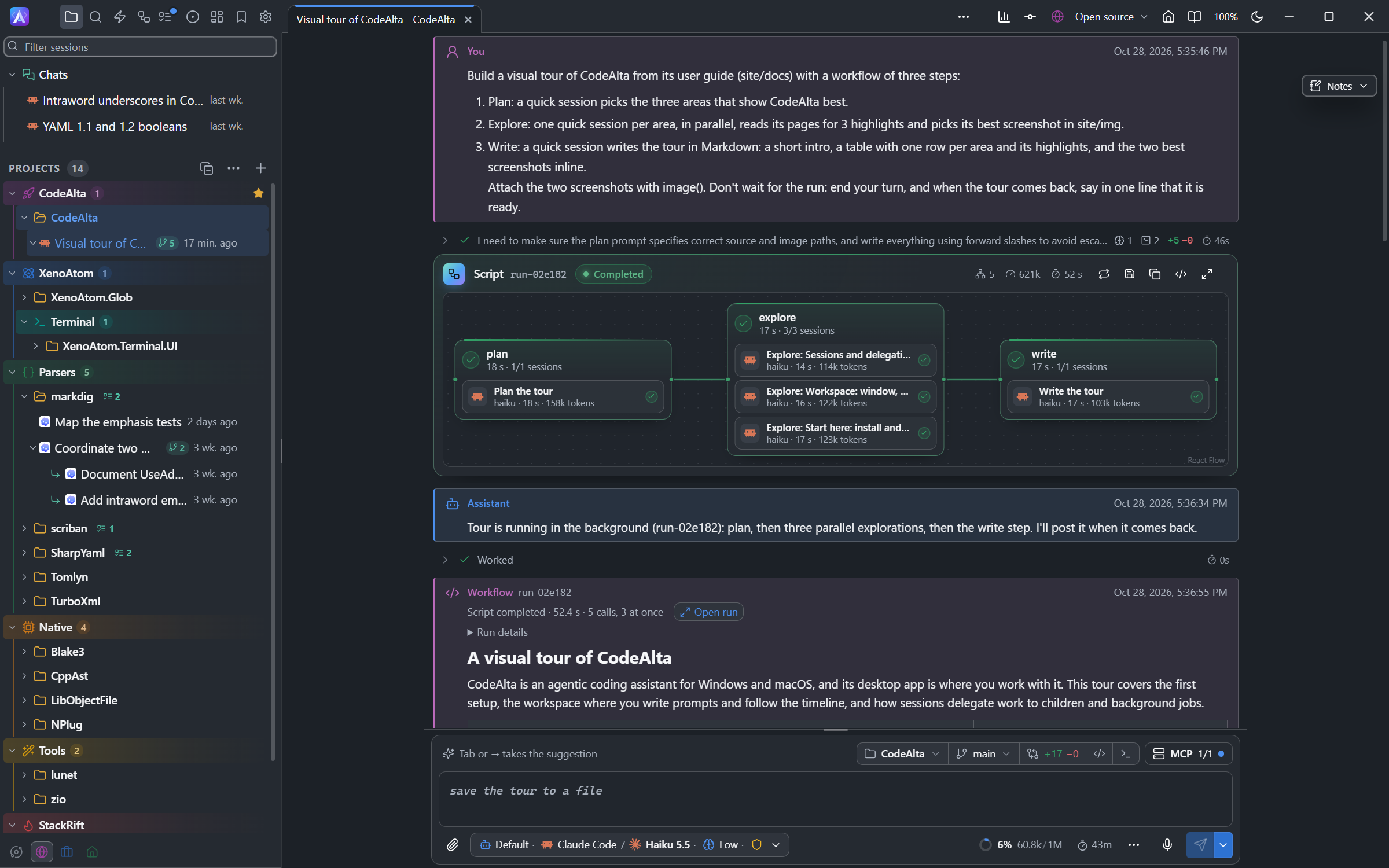
- The head: the title and the run id, the state (running with its time, waiting for you, sleeping, completed, failed, interrupted), the sessions it started, their tokens and its duration, and the actions as icons (in its … menu when the conversation is narrow): Resume, Rerun with recorded results, Save as script…, Copy as Mermaid, Show the call (the window of the
execcall) and Open run. - The graph, left to right: a box per step, from the steps the script declares (
meta.steps, laid out byafter) or else from the steps it ran, the steps that run together one above the other. In a conversation too narrow for it, the graph runs top to bottom. A step is dim until it runs; while it runs, its ring fills as its sessions end, and the arrow that leads to it flows. Each step lists the sessions it started: the logo of their provider, their title, model, duration and tokens. A click opens a session. Above six sessions, they fold into one bar of how many are done, running and failed; a click lists them, the running and failed ones first. - What the run waits for, or until when it sleeps, shows on a line under the head.
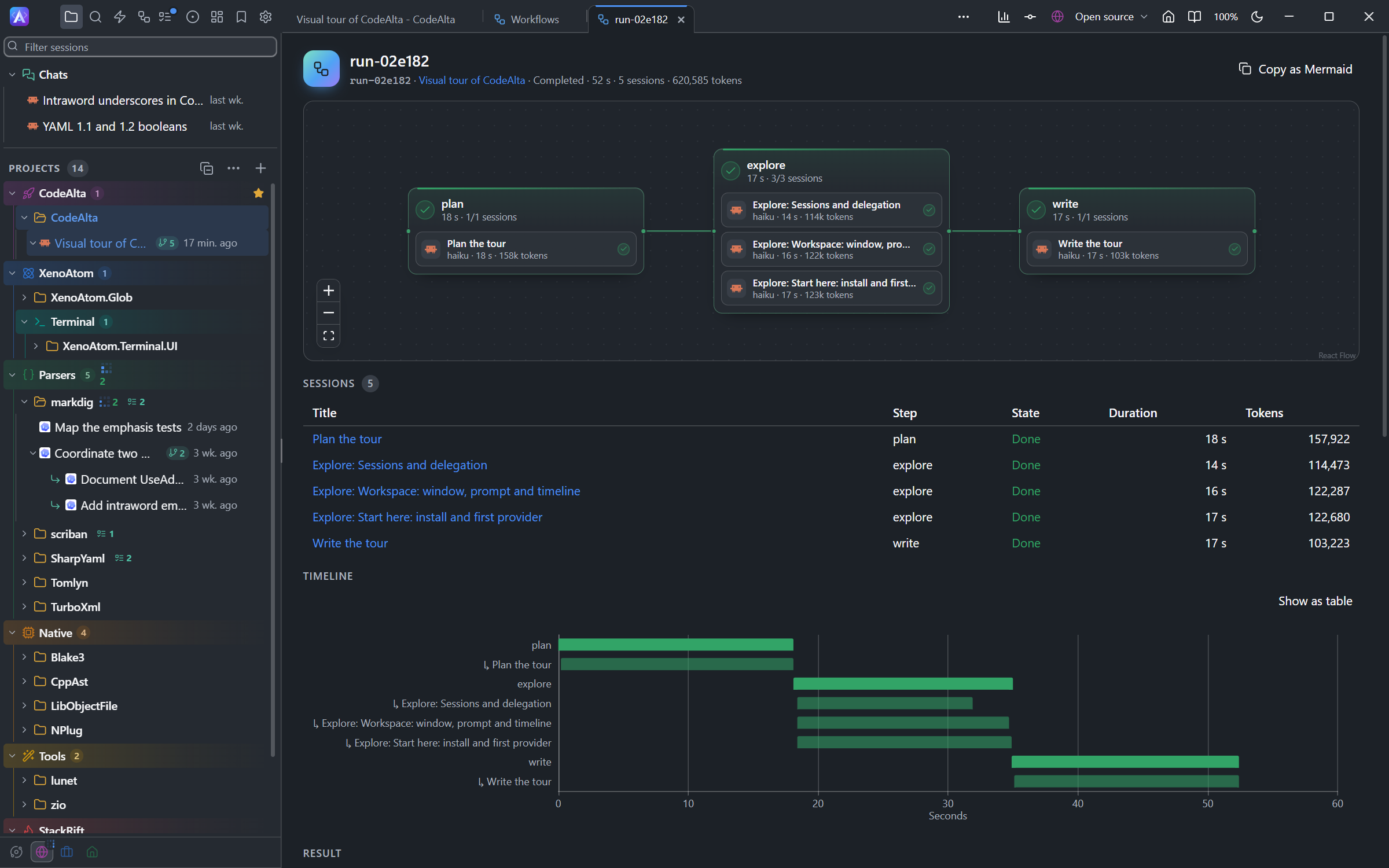
Open run opens the tab of the run: its graph large, which you pan and zoom (a minimap shows once it is larger than the view); the sessions it started (title, step, state, duration, tokens; each opens its session); a timeline of its steps, each with its sessions under it, in the colors of their states; its result and its script. Copy as Mermaid copies the graph as a Mermaid flowchart, as alta workflow show <run-id> --format mermaid gives it. The tab is restored when CodeAlta starts again, while the run is still kept.
Click the card of a script without steps or sessions, or Show the call on a workflow, for the window of the call:
- Console: the calls, and the result and output the model read.
- Script: the code that ran.
- Details: the records of the call.
Long scripts
exec waits 30 seconds for a script, or what its first line says (yield_ms). A script still running then goes on in the background: the agent can call wait for it, which waits 30 seconds by default and at least 10 seconds unless it stops the script, or end its turn. When it ends, its result comes back to the session as a Workflow message.
While it runs, it is listed above the prompt with what the session runs in the background: click it there to go to its card in the timeline.
Another session, or you from a terminal, reads a run with alta workflow list, alta workflow show <run-id> (its steps and the sessions it started) and alta workflow result <run-id>, and stops it with alta workflow cancel <run-id>. CodeAlta Desktop and CodeAlta TUI keep the runs that ended, the 100 newest for 14 days at most, so these commands, the Workflows tab and the tab of a run still find them after CodeAlta starts again.
The source of each script is kept in the scratchpad of the session, and its result says where. An agent fixes a long script by editing that file and running it again with workflow({ scriptPath }).
The result
What a script returns is what the agent reads, and you read it too: in the Workflow message of a script that ended in the background, and in the tab of its run.
- A text is shown as Markdown: headings, lists, tables, code. A link to a file opens it in CodeAlta, a picture too (
). - An object or an array is shown as JSON. A list of texts of several lines, such as the answers of sub-agents, is shown as sections.
image(path, { title })attaches a picture file to the result (PNG, JPEG, GIF or WebP, 8 at most): you see it as a thumbnail, and the agent sees the picture too. A file that is missing or not a picture is named in the result instead.- A result longer than the budget of the script (
max_output_tokens, 10,000 tokens by default) is saved whole in a file of the session, with its attachments under~/.alta/sessions, and goes with it. The agent and the card get a preview of its start and its end with the path of that file: the agent reads the rest there when it needs it, and Open the full result opens it. - Run details shows what the run wrote besides its result: its output, where its time went, an error.
Resume a run
CodeAlta Desktop and CodeAlta TUI keep each run with the result of each step(). A script that ran when CodeAlta ended shows as interrupted in the timeline. Its card, or its block, then offers:
- Resume, on an interrupted run: the script runs again, and the steps it completed give their recorded results without running. A step that changed, and everything after it, runs again.
- Rerun with recorded results, on a run that ended: every recorded step gives its result, and only the rest of the code runs. This fixes the end of a script without paying again for the sessions its steps started.
- Rerun from this step, on a step of the graph (its button shows when the pointer is over it): the steps before it give their results, and that step and what follows run again.
Each one asks the session of the run to call exec again: it runs with that session's tools and permissions. From a terminal or another session, alta workflow resume <run-id> does the same, with --all or --from <step>.
A run that CodeAlta closed during a sleep() resumes by itself when it wakes, and its card says when. This is the only resume that happens without you, and only when nothing below stops it; otherwise the run waits for Resume. A resumed run sleeps only the rest of its sleep.
A run does not resume:
- when the script changed: rerun it with recorded results instead;
- when a call that may not run twice, such as a command, was in flight when it stopped: the agent asks you first, because its outcome is unknown.
Reads, listings and searches are run again without asking. A step whose value is not JSON, or is larger than 256 KB, always runs again.
The steps of a library script, such as those Run… and the automations start, are kept and replayed like the others. Their names start with the name of the script and the number of its call, from 0: count-steps#0/count. alta workflow resume <run-id> --from count-steps/count names it while the script was called once, and --from count while no other step has that name; a name that fits several steps is refused with their names.
Scripts of the library
A script worth keeping goes in the library, where any session runs it by its name with workflow("name", args):
- the samples that come with CodeAlta;
- your scripts, in
~/.alta/scripts/<name>.js; - the scripts of a project, in
.alta/scripts/<name>.js, committed with it. A project script wins over yours of the same name, and yours over a sample.
The samples show what scripts do well, and are a start for your own (alta script edit <name> gives a copy to change):
| Sample | What it does |
|---|---|
review-pr |
Reviews a pull request from several angles at once, one session each, then merges the findings into one review |
compare-models |
Gives the same task to several models, then has a judge compare their answers |
fix-failing-tests |
Runs the tests, then gives each failing test to a session of its own. The sessions share the folder of the project: one works at a time unless at_once says more |
triage-issues |
Classifies each open issue of the project's tracker (kind, priority, summary) and reports them by priority |
research |
Splits a question into sub-questions, researches each in a session, then writes one answer |
A library script starts by describing itself. Its params are checked before it runs: a missing argument, an unknown one or one of the wrong type stops the call with a message that says which.
export const meta = {
  name: "count-lines",
  description: "Counts the lines of files.",
  whenToUse: "To size the files of a change.",
  params: { files: { type: "array", description: "The paths" } },
};
const read = await Promise.all(args.files.map(path => tools.read_file({ path })));
return read.map((r, i) => ({ file: args.files[i], lines: r.content.split("\n").length }));
Agents find a script by what it does: codemode.search() in a script returns it as workflow:<name>, and alta search --kind script finds it by its name, its description and its whenToUse. With tool: true in its meta, a script is also a tool of the sessions of its project while Code Mode is on, named after it (review_pr), whose arguments are its params: the model loads it when it needs it, and calling it runs the script.
Agents manage the library with alta script:
| Command | What it does |
|---|---|
alta script list, alta script show <name> |
List the scripts, read one (--declarations for how to call it) |
alta script run <name> --arg <key>=<value> |
Run a script in a new session of the project, as Run… does. A value is JSON (7, ["a","b"]) unless the parameter is a string |
alta script edit <name> |
Copy a script into the scratchpad of the session, where the agent changes it with its file tools |
alta script check <name-or-path> |
Check that a script parses and describes itself |
alta script save <name> --from <path> |
Publish a script, in the project (--scope global for yours). With the --hash that edit gave, a save is refused when the library copy changed since |
alta script delete <name> |
Delete a script |
A sandboxed session reads the library but does not save in it. alta script run from a terminal needs a CodeAlta that keeps running: altacli alta script run refuses, since its CodeAlta ends with the command.
Your scripts and the samples are in every space unless you limit them, as skills are, in ~/.alta/config.toml. A script limited so is listed, found and run only in those spaces; the scripts of a project are in every space of its sessions.
[scripts.spaces]
review-pr = ["work"]
The Workflows tab
In CodeAlta Desktop, the Workflows button of the title bar (or Workflows in the command palette) opens a tab with the library and the runs:
- Library: the scripts the project chosen at the top sees in the space the window shows, in three parts: This project (its
.alta/scriptsfolder, shared with it), My scripts (your~/.alta/scriptsfolder, for every project) and Samples (they come with CodeAlta). A script of the project replaces one of yours or a sample of the same name. Hide samples, beside the search, keeps the samples out of the list until Show samples. Each card has the description of its script, its parameters (*for a required one) and its steps drawn small; a step that runs once per item shows×.- Show the script opens it in a window of its own: what it does (its description, its steps and its parameters), then its code, highlighted.
- Edit opens a script of the project or of yours in the code editor; Delete deletes its file, after a question. A sample is neither edited nor deleted.
- Agents write the scripts: ask for one in a session, or click Save as script… on the card of a run that went well.
- Runs: the scripts running in CodeAlta and those it keeps that ended, the running ones first. Click a run to open its tab.
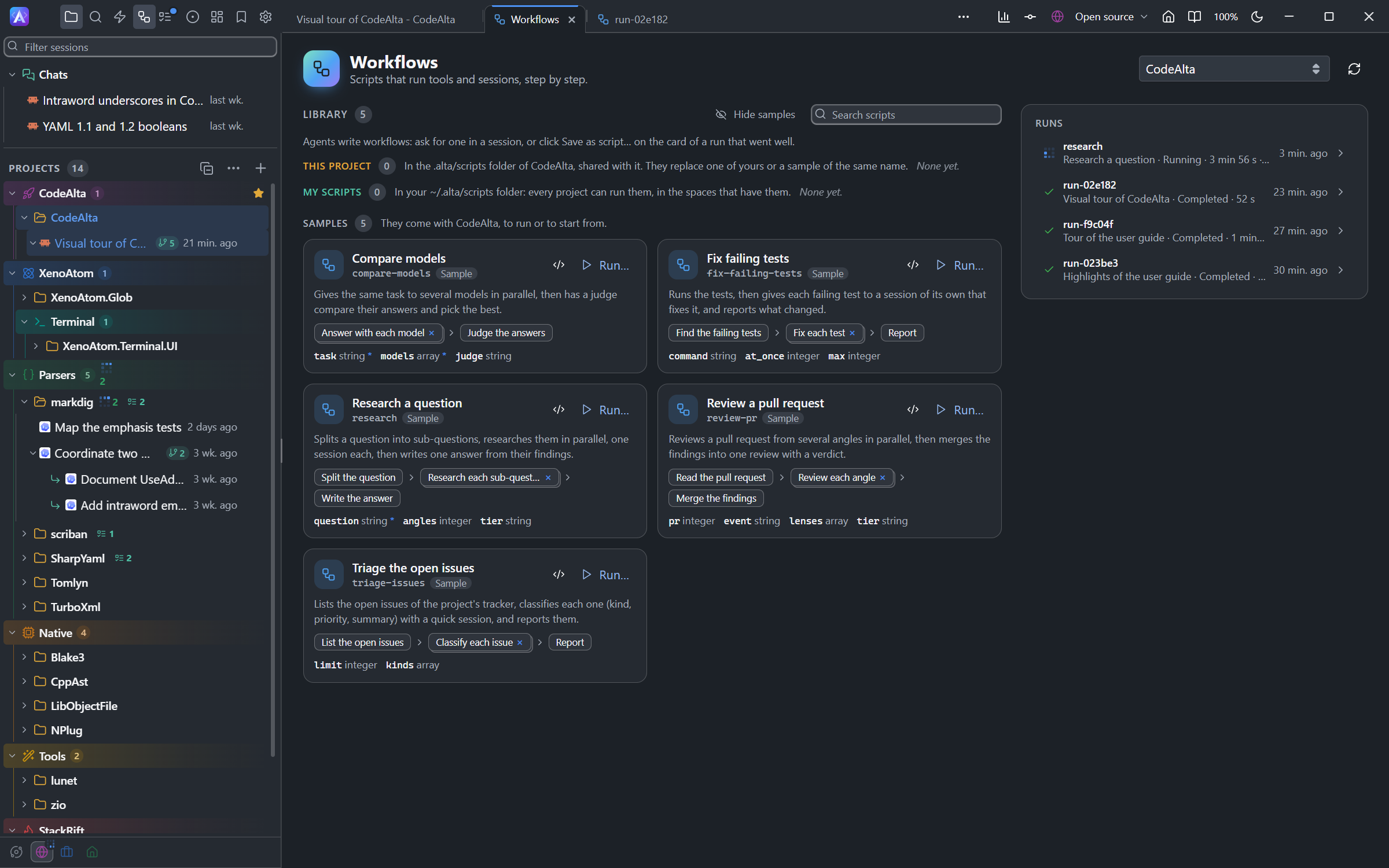
To run a script, click Run… on it, fill in its parameters, choose the project it runs in, then click Run. A list or an object is written as JSON. The script runs in a new session of that project, which opens. That session has exec even when Code Mode is off.
Runs with is the Agent chip of that session: with Use the defaults on, it takes the default provider and your settings; turn it off to choose the agent prompt, the model, its reasoning effort, the permission mode, review before commit and the sandbox. That model starts the script, and the sessions the script starts without a tier or a model run with it too.
To keep a script that ran in a session, click Save as script… on its card in the timeline once it ended, and give it a name. The session is asked to turn it into a library script: the values it was written for become parameters, then it is checked and saved under that name.
Stop a script
A script can run for hours, or sleep for days. To stop one:
- in the timeline, click Stop on its card, or in its tab;
- or click Stop beside it in the list of what the session runs in the background, above the prompt.
An agent stops one with wait and terminate, or one of another session with alta workflow cancel <run-id>, as it can stop that session. The sessions the script started stop with it. Its session is told who stopped it.
Limits
No limit of time or of number of calls cuts a script, so research over many topics or several days is not cut short. What protects CodeAlta:
- 256 MB of memory and a few seconds of computing at a time, which a script uses only between its calls; a guard against deep recursion;
- 32 calls at once, and 8 sessions at work at once, per script: the others wait for their turn;
- sessions started by scripts, 3 levels deep;
- 32 scripts at a time per session, 128 in CodeAlta.
A script that reaches one stops with a message that says which. A script can set its own limits on its first line: timeout_ms for its time, and budget_tokens for the tokens of the sessions it starts.
Calls made before a failure are not undone: the result lists them.