Delegation
An agent of CodeAlta can do more than answer: it can start sub-agents, run commands in the background, set reminders, keep notes, ask you questions and look at your other sessions. It does so through alta, a tool CodeAlta gives every agent, whatever its provider.
You do not type alta commands yourself: you ask for the outcome, and the agent uses the tool. For example "create two child sessions and compare their findings", or "keep a checklist in the notes while you work". The commands on this page tell you what an agent can do; it reads their exact syntax from the tool's help.
Sub-agents
A sub-agent is a child session with a context of its own, which works in parallel with its parent. The agent decides by itself when sub-agents help:
- When the work has independent parts (several modules to look into, research beside an implementation, a review of a diff), it gives each part to a sub-agent and keeps the decisions and the final answer.
- It works directly when the task is small or does not split.
- It gives simple work a lower reasoning effort.
- A sub-agent does its work itself: it does not pass it on to a single sub-agent of its own.
- A sub-agent runs the Default agent prompt, or another one when asked. Under a session in Plan mode, sub-agents are told only to read.
Say so when you want it otherwise: "do not use sub-agents", or "use a sub-agent for each folder".
In CodeAlta Desktop:
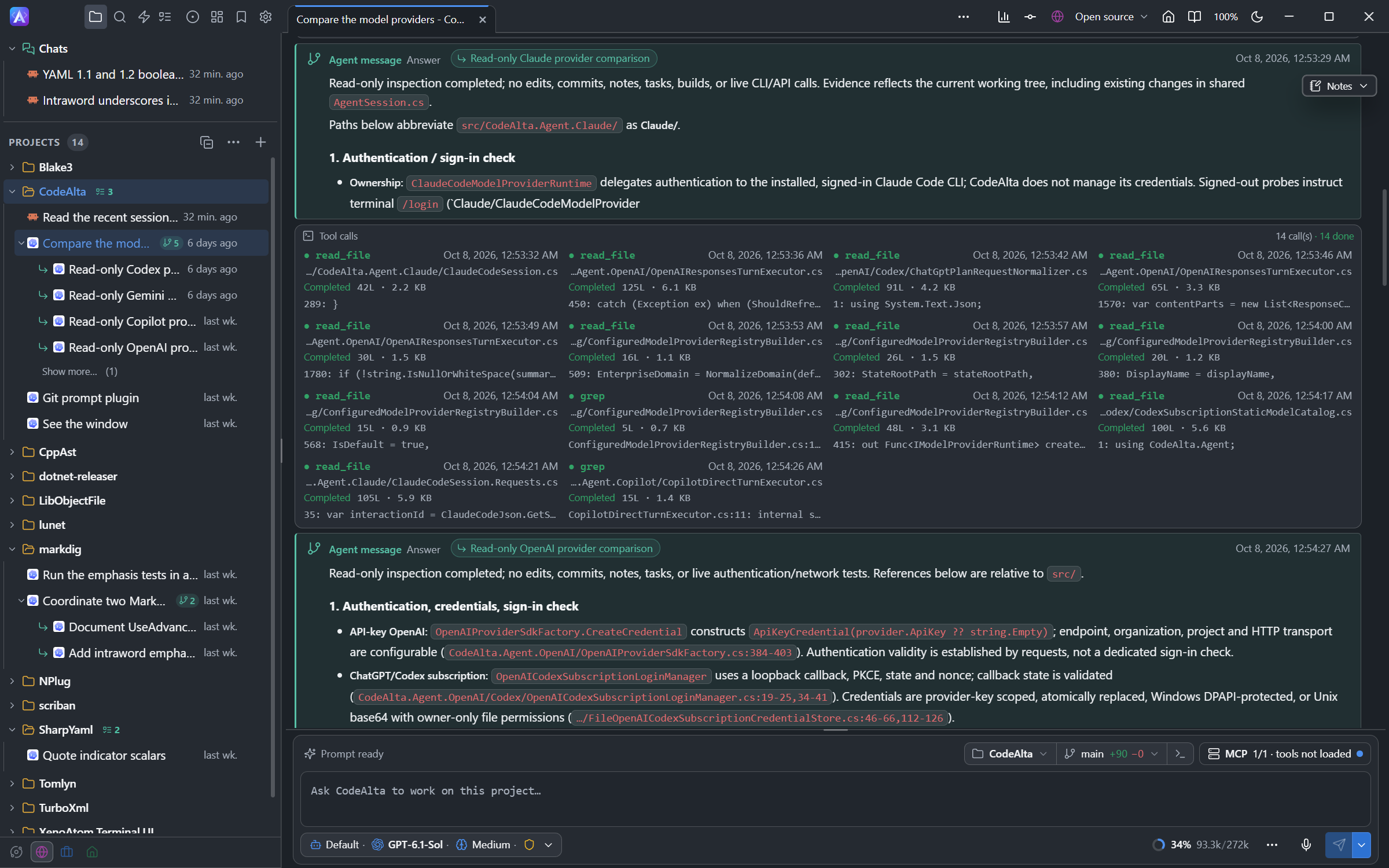
- The sub-agents of a session are listed under it in the Explorer, and the session shows how many it started. Click its arrow to hide or show them.
- The 4 most recent are listed, and Show more… lists the others. Settings > Appearance sets that number.
- A sub-agent is an ordinary session: open it to follow its work, or to write to it.
- What agents send each other is shown as an Agent message, in its own color, with the name of the session it comes from. Click the name to open that session.
- What CodeAlta sends a session by itself is titled by what it is, not You: Reminder, Background job, User review, User answer, Automation, Model fallback. CodeAlta TUI says the same in place of User Prompt.
Child sessions
A child session can be in another project, in the chats, or in another space than its parent: an agent of a chat can start sessions in projects. Such a child is listed at the top of its own project, not under its parent. CodeAlta keeps who started each session, also after a restart.
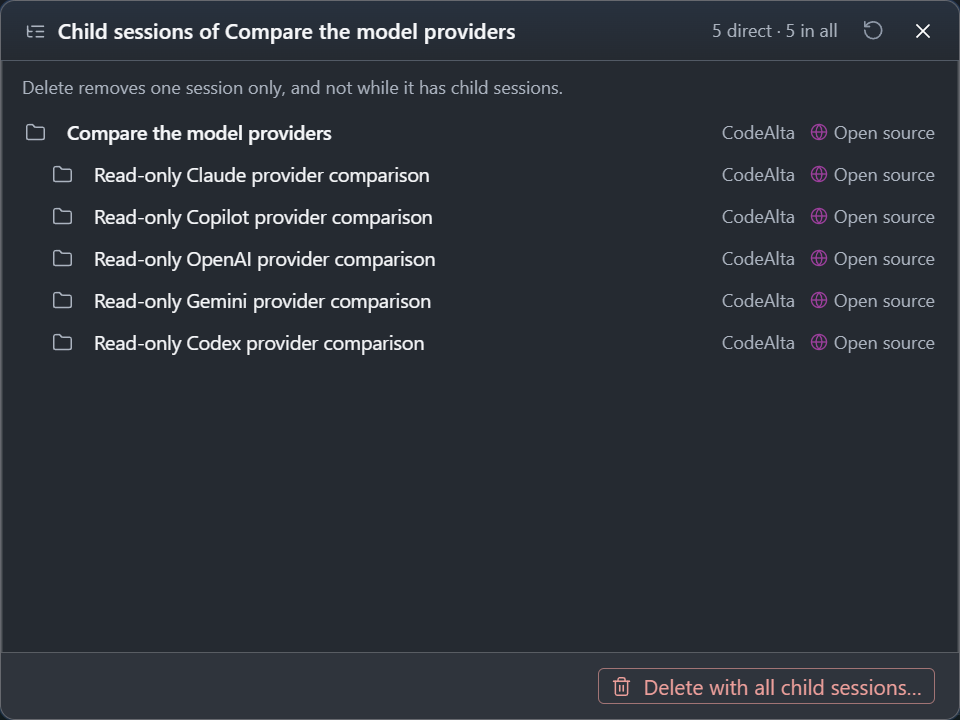
- Child sessions… in the menu of a session lists every session below it, wherever it is: the tree, the number of direct and of all children, the project or chat and the space of each, and the ones at work. Click one to open it.
- Open parent session in the menu of a child session opens the session that started it.
- Delete deletes one session only, and never one with child sessions: it shows the child sessions instead.
- Delete with all child sessions…, in that list, deletes the session and every session below it, after a confirmation. Nothing is deleted while one of them is at work. Projects and their files are kept.
Delegate work
You can ask an agent to create and coordinate child sessions, in this project or another one, with another provider, model or reasoning effort:
Start a low-reasoning child session for the current project to inspect
the latest test failure logs while you continue reading the parser code
here. Have the child report only the likely failing assertion and
relevant files.
Create a project-scoped session for `../OtherRepo` using the fastest
available model. Ask it to summarize the public API shape and send the
summary back here.
- The final answer of a child, or its error, comes back to the parent by itself. The parent does not need to check on it while it waits.
- A message between agents steers a recipient that is working, or starts a new turn when it is idle. An agent can also queue it for later. With a provider that cannot steer, the message waits in the queue.
- Child sessions that read run in parallel. For edits, prefer one writing child at a time, so the parent can check each result, unless each child has its own worktree.
- Give each child a narrow task and a bounded answer, such as "do not edit files; return the likely cause, the files inspected and one recommended test". Bounded answers are easier to compare.
Compare models
Ask for the same task in several child sessions, one per provider or reasoning effort, and a comparison when they all report back:
Run the same investigation in three child sessions: Codex high,
Copilot high, and Anthropic high. Give each child the same task and ask
them not to edit files. When all replies arrive, compare correctness,
risk, and recommended next step.
The agent can list the providers and models available, and the model tiers, to pick candidates:
Which enabled providers can run a high-reasoning model for this project?
Pick two good candidates for a comparison run and explain the tradeoff
before creating sessions.
Be explicit about cost, speed and whether the children may edit files.
Background jobs
An agent can start a command without waiting for it: a long build or test run, or a command that waits for something, such as gh run watch <run> --exit-status. CodeAlta runs it as a background job of the session. When the command ends, CodeAlta sends the session its exit code and the end of its output, whether it succeeded or not: an idle session starts a new turn with it, a working one receives it in the running turn.
Push the branch, then start `gh run watch --exit-status` on its CI run as a background job. Go on with the release notes meanwhile, and fix what the run reports when its result comes back.
In CodeAlta Desktop:
- The line above the prompt shows a cog with a spinner and N in the background while jobs run. Click it to see Running and Recent jobs with their duration and result. Click a job to see its command and its output as it arrives; Stop stops it. A job stays listed ten minutes after it ends; with only ended jobs left, the line reads N ended.
- In the conversation, the result is a Background job card. Click it to see the command, the result, the time and the output; its Details tab shows what is recorded of the job.
The agent uses alta job start (with --timeout for a command that could hang, and --notify success or never to change when the result is sent), list, status, output and cancel.
- Jobs end when CodeAlta exits. CodeAlta Desktop asks before exiting while one runs.
- A session whose permission mode asks before commands cannot start a job.
Reminders
A reminder is a prompt sent to a session later. An agent that waits for something without a command to wait on, such as a deployment or a child session, sets one to come back and check, and says so in its answer.
Start a read-only child session to inspect the build logs. Set a reminder for this parent session in 5 minutes to check whether the child has reported back.
- The agent uses
alta reminder create --duration <seconds> --content ..., for its own session or another one (--session <id>), once or several times (--repeat <count>), andalta reminder listandalta reminder delete <id>. - A reminder is listed in Reminders until it fires.
- When the session is idle, the reminder starts a turn. When it is working, CodeAlta Desktop gives the reminder to the running turn (or to the next one, with a provider that cannot steer), and CodeAlta TUI queues it for the next turn.
- Reminders are lost when CodeAlta exits.
- In CodeAlta TUI, the clock button of the prompt bar or
/reminder(Ctrl+G Ctrl+D) creates, edits and deletes the reminders of the selected session.
Notes and questions
Notes are sticky Markdown of a session, where the agent keeps a checklist, a status or its next steps (see Session notes). The agent writes them with alta notes set --stdin, reads them with alta notes get and clears them with alta notes clear.
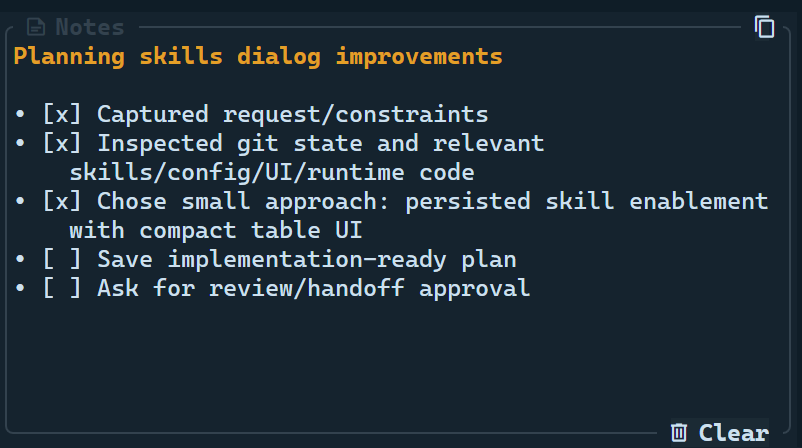
While you update the docs, keep a concise Notes checklist with major milestones. Update it only at meaningful points and clear it when the work is complete.
Good notes are short: 10 to 15 lines, checkboxes when useful, only current blockers and next steps.
Questions: when your answer changes the scope, the safety, the cost or an approval, ask the agent to ask you first. It queues its questions with alta ask and stops. CodeAlta shows them one at a time with their choices, and sends your answers back as the next prompt.
Before editing, ask me whether to update only website docs or both website and internal docs. Include a short description for each choice.
To have you review a file or changes, agents use alta review request instead: see Reviews.
Plans and prompts
For broad work, ask for a plan first:
Use Plan mode for this task. Inspect the relevant files, write an implementation-ready plan under .alta/plans/, and ask me to review it before execution.
After you approve it, CodeAlta Desktop shows the plan as a card with the choices of a work item. In CodeAlta TUI, ask the session to execute it:
Execute the approved plan at .alta/plans/2026-06-04-website-agent-workflow-docs.md.
Plan mode is an agent prompt, not a sandbox: it avoids edits other than the plan file, but review the plan and the later diff.
An agent can also list the agent prompts, recommend one, create one, or switch its session to one:
Create a project agent prompt named triage that inspects recent session history, creates read-only child sessions when useful, and reports a prioritized issue list.
Switch this session to the triage prompt for the next turn.
For a workflow you repeat, write it in a custom agent prompt: a release prompt can always keep a checklist, ask before publishing and delegate checks to child sessions.
Inspect CodeAlta
An agent can look at what CodeAlta knows before it acts: the projects and their spaces, the sessions of a project and their results, the providers and models. This helps when you have many sessions, want to recover earlier work, or want to avoid doing it twice:
Before changing files, inspect the recent CodeAlta sessions for this
project and check whether a recent session already investigated the
plugin startup issue.
Find the child sessions created from this session and summarize their
final answers, grouped by model.
Ask for the outcome you want, not for individual commands. An agent starts with alta session current when it needs the id of its own session.
Fork or rewind by an agent
A session is a list of turns: one prompt, and everything the agent did until it stopped. An agent can start a new session from one of them, or take a session back to one of them (see Fork and rewind):
List the turns of this session, then fork it before the turn where you started the cache rewrite and try the other design there. Leave this session as it is.
The last two turns of the review session went the wrong way. Rewind it to before them, then send it this prompt instead: ...
The agent finds the turn with alta session turns, by its number or its run id, then runs:
alta session fork [<session-id>] [--before <turn> | --after <turn>]: a new session with the turns up to that point, beside its source. The source may be running; the turn in progress is left out, so a session can fork itself.--parent <session-id>makes the fork a sub-agent, and--worktreegives it its own git worktree, so two attempts do not write the same files.alta session rewind <session-id> (--before <turn> | --after <turn>): removes that turn and all later ones. The session must be idle, and cannot rewind itself. The session as it was is kept as "… (before rewind)", unless the agent passes--discard.
A fork or a rewind changes the conversation only. Files changed by the removed turns are not restored, and a fork sees the folder as it is now: ask the agent to restore them (with git, for example) when you need them back. A rewind with --discard cannot be undone.
What agents can use
The alta commands depend on the host, the plugins turned on and the session. An agent reaches only the sessions of its own space, and the resources its space has.
| Group | What the agent can do | Example prompt | Good to know |
|---|---|---|---|
version, tool |
Read the version and the capabilities of the tool. | “Check which live-tool capabilities this session has.” | Read-only. |
project |
List, show, resolve or add projects. | “Resolve the current project and summarize its catalog entry.” | upsert changes the project list. |
space |
List, create, change, delete and order spaces, put projects in them, show one. | “Create a space called Client work with these three projects and show it.” | switch changes the space the window shows. |
session |
Inspect, create, send to, queue, steer, stop, compact and report on sessions; list turns, fork, rewind; archive and restore. | “Create a same-model child session to inspect the failing tests, then report its final answer here.” | Can stop runs and remove turns: ask for confirmation of disruptive actions. |
bookmark |
List, show, add, name and remove bookmarks. | “Summarize the decisions my bookmarks of this project hold.” | Adds a bookmark only when you ask. |
prompt |
List, read, create, edit and select agent prompts. | “Create a project prompt named reviewer for read-only code reviews.” | Writes prompt files. |
ask |
Ask you structured questions. | “Ask me which storage format I prefer, with the options you see.” | The agent stops and waits for your answers. |
review |
Ask for your review of a file, of the changes or of a branch; answer your comments. | “Ask me to review the plan, with a question for each open decision.” | Reviews of changes need CodeAlta Desktop. |
notes |
Read, replace or clear the notes of the session. | “Keep a 5-item checklist visible in Notes while you work.” | note is an older name. |
reminder |
Schedule a prompt for a session; list and delete reminders. | “Remind yourself in 5 minutes to check the child session result.” | Only while CodeAlta runs. |
job |
Run a command in the background; list jobs, read their output, cancel them. | “Run the full tests as a background job and fix what fails.” | Runs with the rights of CodeAlta. Jobs end when CodeAlta exits. |
provider, model |
List providers, models and model tiers. | “List enabled providers that can run a high-reasoning model.” | Read-only; says nothing of billing. |
skill |
List, show and activate skills. | “Activate the IL decompile skill before inspecting the assembly.” | skills and skills_activate are older names. |
diff, editor |
Show you the changes of a project (alta diff show, --file to select one), or open a file at a line (alta editor open --file <path> --line <n>). |
“Open the file you changed at the line of the fix.” | CodeAlta Desktop only. |
canvas |
List, open, focus and close the tabs plugins provide, and run their actions. See Canvases. | “Open the Statistics tab for this project.” | CodeAlta Desktop only. |
landing |
Open the welcome page. | “Show me the welcome page.” | CodeAlta Desktop only. |
appearance |
Read how a session is shown; change the width of its conversation. | “Show this conversation at 70% of the width.” | CodeAlta Desktop only; never changes your settings. |
window |
List the windows, tabs and monitors; open, place, name and close windows; move tabs. | “Move this session to a new window on my second monitor.” | CodeAlta Desktop only. |
terminal |
List, create, read, type in and close terminals. | “Start the dev server in a terminal and tell me when it is ready.” | CodeAlta Desktop only. Typing runs commands. |
task, plan |
List, read and update work items. | “List the open tasks of this project and do the first one.” | A proposed task is shown to you at once. |
issue |
Read the issues and pull requests of GitHub, GitLab, Azure DevOps, Bitbucket or Jira. | “Summarize the open issues of this project.” | Read-only: changes go through gh, glab, az or alta jira. |
ui |
Get the tools that see and drive the window. See UI tools. | “Take a screenshot and tell me what the Changes tab shows.” | CodeAlta Desktop only. |
automation |
List, create, run, turn on or off and delete automations. | “Create an automation that reviews the open pull requests every morning at 9.” | CodeAlta Desktop only. |
jira |
Set up Jira and change its issues. See Jira. | “Move PROJ-123 to In Progress and add a comment with the branch name.” | Plugin. |
plugin |
Inspect plugins; in CodeAlta Desktop, create, build and reload one. See Plugin development. | “Write a plugin that shows the current git branch beside the prompt.” | Building a plugin runs its code. |
mcp |
Configure, activate, search and call MCP servers. | “Activate the memory MCP server and summarize the graph.” | Plugin. An activated server's tools work in the same turn and stay for the session. |
statistics |
Read the numbers of your sessions. See Statistics. | “How many tokens did I use this week, by model?” | Plugin. history changes how history is read: ask for it only when you want it. |
Safety checklist
Agents can change files, settings and other sessions. Keep prompts explicit:
- say whether the agent may edit files or must only read;
- say whether a prompt, an MCP server or a setting is global or for the project;
- ask for a question before anything destructive, published, paid, or touching credentials or external systems;
- keep child tasks narrow;
- review plan files, prompt files, MCP and TOML changes, and the final diff.
Custom prompts and project configuration change how future agents behave. Review them like code, especially in shared repositories.